
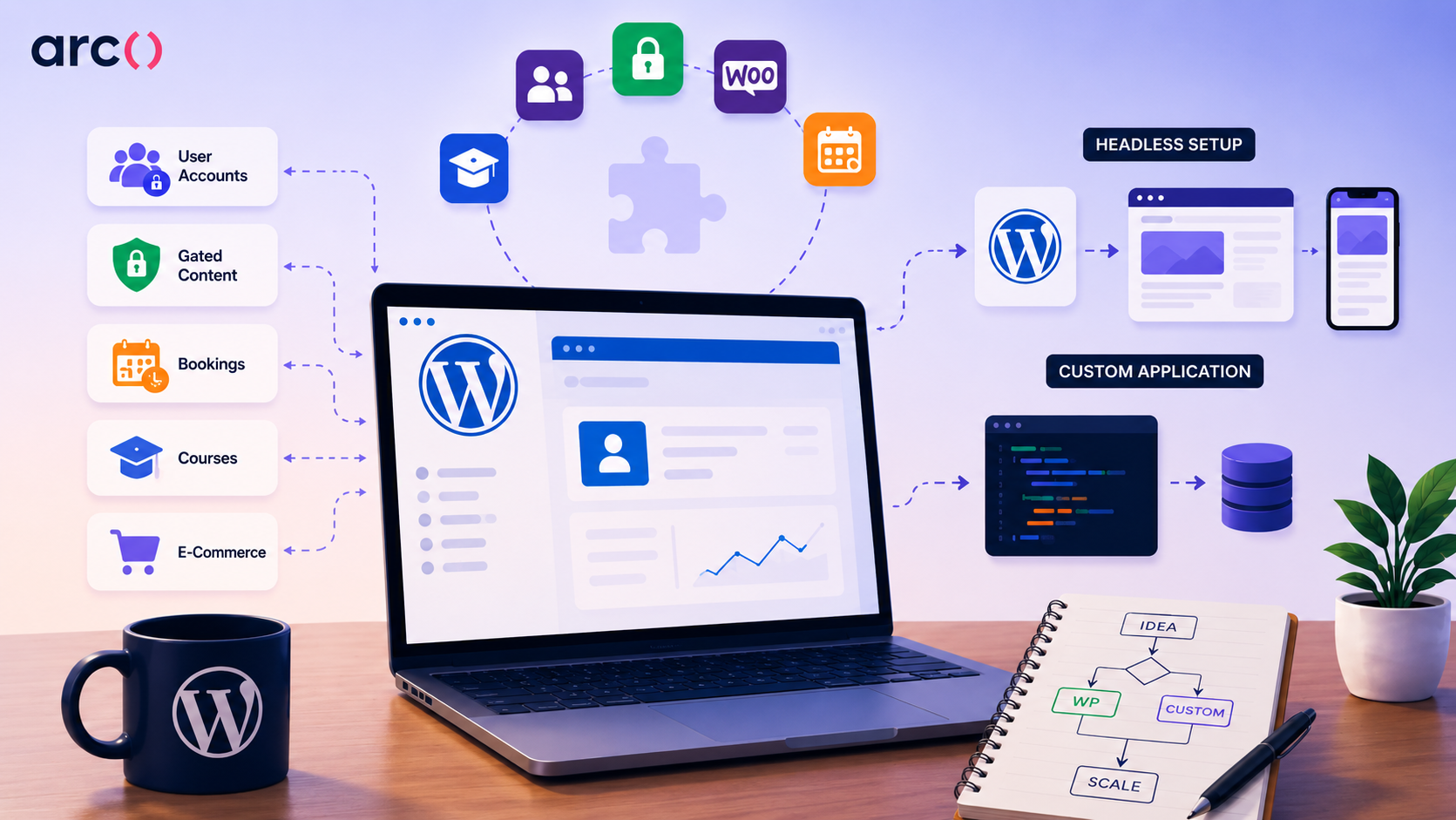

WordPress can build an app, but only for certain things. User accounts, gated content, simple booking, and course delivery: a good plugin stack handles all of that without much trouble. Push past it into complex business logic, real-time features, thousands of concurrent users, or a mobile app that actually feels native, and you stop building on WordPress and start fighting it.
Better to know where that line sits today than six months from now, after you’ve patched together a dozen plugins and you’re staring down a rebuild.
Most people landing on this question are trying to figure out one of three things:
- How to add login, profiles, or other interactive features to a WordPress site they already have
- Whether to use WordPress purely as a content backend and build a custom front end on top
- Whether WordPress can replace a real application framework entirely
The right answer depends on which one you’re actually asking about. Cost, performance, and how much pain you’re in a year from now all hinge on it. That’s what this guide walks through: where WordPress holds up, where it doesn’t, and what to do once you’ve outgrown it.
In this guide:
- What people mean by an app in a WordPress context
- Where WordPress is a good fit
- Real apps running on WordPress today
- How to build a basic membership app on WordPress (step by step)
- Where the model starts to fail
- Mobile: PWA vs. WebView wrappers
- WordPress app-building tools at a glance
- A practical decision framework
- WordPress vs. headless WordPress vs. custom development
- What headless WordPress solves and what it does not
- Better paths once requirements outgrow WordPress
- Cost and timeline reality check
- FAQ
What People Mean By an App in a WordPress Context
The word “app” covers everything from a login-protected dashboard to a full SaaS product, and WordPress can realistically handle only part of that spectrum.
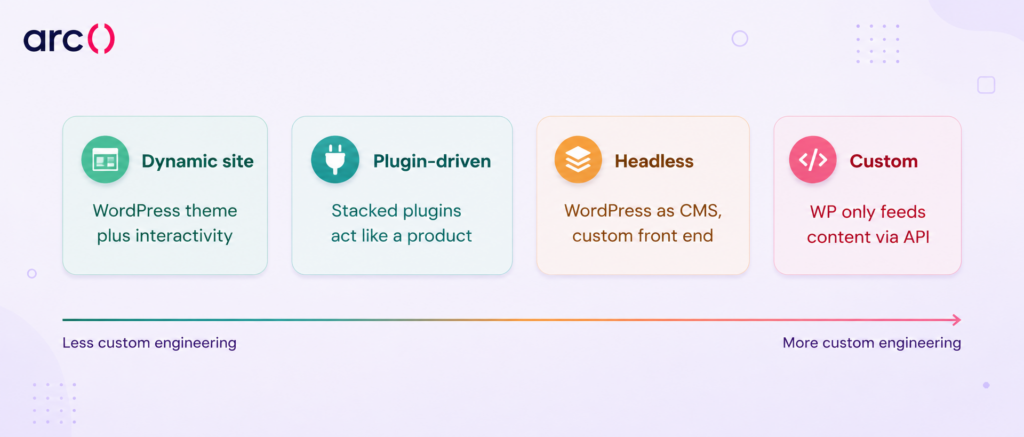
Most WordPress “apps” fall into four categories: sites with dynamic, logged-in features; plugin-assembled product experiences; headless setups where WordPress only manages content; and fully custom products that just happen to pull data from WordPress.
- Dynamic Sites With App-Like Features
This is the most common scenario. You take a standard WordPress install and add features like user registration, profile pages, front-end form submissions, or conditional content visibility.
Plugins like Ultimate Member, Gravity Forms, and Advanced Custom Fields handle the heavy lifting. The result looks and feels interactive to your users, but under the hood it is still a WordPress theme rendering pages on each request. This works well when your “app” is really a content site with some interactivity layered on top.
- Plugin-Driven Product Experiences
Here, you are stacking multiple plugins to replicate what a purpose-built application would do. A membership plugin (MemberPress), a payment plugin (WooCommerce), a booking plugin (Amelia or Simply Schedule Appointments), and a custom fields plugin (ACF or JetEngine) combine to create something that functions like a product.
The user can log in, pay, book, and access gated material. The risk grows with every plugin you add, but for straightforward use cases, this approach ships fast and costs relatively little upfront. This is the most common version of what people mean when they search for how to build an app for WordPress: not a single tool, but a stack of plugins working together.
- Headless Setups With WordPress as a CMS
In a headless configuration, WordPress runs only on the back end. Content editors use the familiar WordPress admin, but the front end is a separate application built with React, Vue, Next.js, or a similar framework.
Data flows from WordPress to the front end through the REST API or WPGraphQL. This gives you full control over the user interface, performance, and interactivity, while keeping WordPress as a content repository.
- Fully Custom Products That Only Reuse WordPress Content
Some teams build a standalone web or mobile application and pull in blog posts, documentation, or marketing content from WordPress via API. WordPress is not the app here, but a content feed.
The actual application logic, user management, payments, and business rules live in a separate codebase. This is the cleanest separation, and it makes sense when your product has real engineering complexity, but your marketing team still wants to publish in WordPress.
Where WordPress Is a Good Fit
WordPress handles app-like projects well when the core need is content delivery with controlled access, structured scheduling, or catalog-style browsing. Membership gating, course delivery, simple booking flows, lightweight marketplaces, and internal knowledge bases are all proven use cases where plugin stacks remain stable and maintainable.
Membership and Gated Content Platforms
MemberPress and Restrict Content Pro are mature, well-supported plugins that handle tiered access, Stripe or PayPal subscriptions, and drip content schedules. If your business model is “pay to access articles, videos, or downloads,” this is one of WordPress’s strongest use cases.
You can launch a working membership site in a weekend. The data model fits naturally: posts and pages are already what you are gating, so WordPress’s native structure works in your favor rather than against it.
Simple Booking and Scheduling Flows
Plugins like Amelia and Simply Schedule Appointments handle appointment booking with calendar views, staff assignment, email confirmations, and payment collection.
For service businesses with fewer than a few dozen providers and a few hundred bookings per week, these plugins are reliable and affordable. The limitations show up when you need complex availability rules, multi-resource scheduling, or real-time inventory management across locations.
Course and LMS Setups
LearnDash and LifterLMS turn WordPress into a functional learning management system. You get course modules, quizzes, progress tracking, certificates, and student dashboards.
For solo educators or small training companies selling a handful of courses to a few thousand students, these plugins deliver genuine value without custom code. Performance starts to degrade once you have tens of thousands of enrolled users running concurrent quizzes or generating reports against large datasets.
Lightweight Marketplaces and Commerce Portals
WooCommerce combined with plugins like Dokan or WCFM can create multi-vendor marketplaces where sellers list products and buyers purchase them. For niche marketplaces with a few hundred vendors and moderate traffic, this setup works.
Product catalog browsing, basic vendor dashboards, and order management are functional out of the box. The ceiling appears when you need custom search algorithms, real-time inventory sync, or transaction volumes that exceed what WooCommerce’s order table structure handles efficiently.
Internal Knowledge Hubs and Staff Dashboards
WordPress works surprisingly well as an internal wiki or knowledge base for teams under 100 people. Plugins like BetterDocs or Jenga Builder, combined with role-based access via Members or User Role Editor, create a gated environment where staff can find SOPs, HR documents, and training materials. Since internal tools rarely face high concurrent usage or public-facing security threats, WordPress’s limitations matter less here.
Real Apps Running on WordPress Today
Pressbooks is the clearest example of a genuine application built on top of WordPress rather than a content site with plugins bolted on. It runs on WordPress Multisite but rebuilds the admin interface, front-end rendering, and export pipeline, turning WordPress into a book-production tool where authors write chapters as structured content and export to EPUB, PDF, and web formats.
It’s been adopted widely in higher education for open textbook publishing, which says something about how far you can stretch the platform when you’re willing to fork deep into its internals rather than stack plugins on top of it.
That depth of customization is also the catch: Pressbooks works because its team rebuilt the parts of WordPress that don’t fit an application use case, not because WordPress handled it natively.
Most teams evaluating how to build an app on WordPress will install MemberPress and call it done. Pressbooks is the proof that the ceiling can be pushed further than typical plugin stacks reach, not evidence that the typical path gets you there.
How to Build a Basic Membership App on WordPress (Step by Step)
If you just want to see what the fast path actually looks like, here’s the shortest real version: a step-by-step guide to what you’re signing up for, with a flag at each point where the simple version starts to strain.
- Install WordPress and a membership plugin. MemberPress is the most common choice; Restrict Content Pro is a lighter alternative. Both install like any other plugin; no server config required.
- Connect Stripe or PayPal. MemberPress walks you through API key setup in its settings panel. This is usually a 10-minute task if you already have a Stripe account.
- Create your membership tiers and pricing. Define what each tier costs and what it unlocks. MemberPress handles recurring billing and trial periods natively here.
- Gate your existing posts and pages by tier. Tag content with the membership level required to view it. Posts and pages are already WordPress’s native structure, so this step fits naturally, which is why membership sites are WordPress’s strongest use case.
Pain point flag: this is fine for a few hundred pieces of content. Once you’re filtering large libraries by tier, access history, or multiple overlapping conditions, you’re pushing into the wp_postmeta query slowdown covered below.
- Set up a drip schedule to release content over time (week 1, week 2, etc.). MemberPress supports this out of the box.
- Add a member dashboard and login flow. Most membership plugins ship a basic one; Ultimate Member or BuddyBoss extend it with profiles and directories if you need more.
Pain point flag: this covers basic “logged in / not logged in” access. The moment you need row-level rules (“this member can only see records tied to their account”), you’re outside what the plugin handles natively. That’s the row-level permissions ceiling covered later in this guide.
- Test the full flow: sign up, pay, get gated access, get dripped content on schedule. And that’s it: a working membership site, no code, built in a weekend. It does exactly what it says on the tin.
The catch is that the tin is small: the moment your requirements go beyond “gate some content and charge for it,” you’re back to the trade-offs we cover next.
Where the Model Starts to Fail
WordPress’s architecture creates specific, predictable failure points once you push past content-centric use cases. Plugin conflicts multiply with each new dependency, performance degrades under concurrent load, the post/meta database schema resists complex data modeling, and real-time or mobile-native features sit outside what the platform was designed to deliver.
Plugin Collisions and Hook Conflicts
WordPress plugins share a single execution pipeline through actions and filters. When you run Amelia for booking, MemberPress for access control, and ACF for custom data, all three hook into wp_head, init, and template_redirect.
A MemberPress access check can fire before Amelia renders its booking form, blocking logged-in members from seeing the scheduler. Or ACF’s custom field saves can conflict with WooCommerce’s order meta, overwriting data.
These conflicts are the natural result of independent codebases sharing one global hook system without coordination. Debugging requires reading through each plugin’s source code to trace execution order.
Performance Limits Under Concurrent Usage
WordPress builds each page by running PHP and querying MySQL on every request. The numbers below are field estimates based on typical managed-hosting setups, as actual results depend on your specific plugins, theme, and host, but they’re a realistic planning baseline.
On managed WordPress hosting like WP Engine or Kinsta, page caching can comfortably handle 50 to 100 concurrent visitors. The moment your app requires logged-in, personalized content, that number drops fast: caching doesn’t work the same way once every visitor is seeing something different.
A membership site serving personalized dashboards to 200 simultaneous users on a typical $50/month managed host will start seeing response times climb past 3 seconds.
Object caching with Redis helps close some of the gap, but it only goes so far. WordPress’s reliance on wp_options autoloading and wp_postmeta JOINs creates bottlenecks that no amount of caching fully removes. At some point, you’re optimizing around the architecture rather than fixing it.
Security Risk From Plugin Sprawl
Every plugin you install is a potential attack vector. Patchstack’s 2024 data showed that 96% of new WordPress vulnerabilities were found in plugins, with only seven affecting WordPress core all year.
A typical app-like WordPress build might use 15 to 25 plugins, each one maintained by a different developer or team, updated on different schedules, and tested against different PHP and WordPress versions.
A single abandoned plugin with an unpatched SQL injection vulnerability can expose your entire database, including user payment information if you are running WooCommerce.
Data Modeling Problems With Post and Meta Tables
WordPress stores nearly everything in two tables: wp_posts and wp_postmeta. Custom post types for “Bookings,” “Invoices,” or “Support Tickets” all share the same table. Meta fields are stored as key-value pairs, one row per field per post.
If your “Booking” custom post type has 20 meta fields and you have 10,000 bookings, that is 200,000 rows in wp_postmeta alone. Running a filtered query (“show all bookings for Provider X between June 1 and June 30 where status is confirmed”) forces MySQL to perform multiple JOINs against this key-value table.
A proper relational database would handle this in a single indexed query against a dedicated bookings table. In WordPress, it becomes noticeably slow beyond a few thousand records when using multi-field filters.
Limits Around Permissions, State, and Real-Time Features
WordPress’s built-in role system (Administrator, Editor, Author, Subscriber) is flat. You can add custom capabilities with plugins like Members, but there is no native concept of row-level permissions (“User A can see only their own invoices”), stateful workflows (“This ticket moves from Open to In Review to Resolved”), or real-time updates (“Notify the dashboard when a new order comes in”).
Building these features means either writing substantial custom PHP or bolting on external services (Pusher for WebSockets, custom REST endpoints for state transitions), at which point you are maintaining a custom application that happens to run inside WordPress rather than benefiting from it.
Why WebView Wrappers Fall Short on Mobile
Mobile: PWA vs. WebView Wrappers
Before writing off WordPress for mobile entirely, it’s worth separating two very different things that both get called a “WordPress app.” A Progressive Web App (PWA) turns your WordPress site into something a visitor can install on their home screen, launch without a browser bar, and use partially offline; all running through the browser engine, with no app store submission required.
Plugins like SuperPWA handle this conversion: they generate the manifest and service worker that WordPress doesn’t ship with natively, resulting in a legitimate, if limited, app-like experience for content-driven sites. If “app” mostly means “installable, fast-loading, works offline for pages already visited,” PWA is the honest answer, and it’s a real capability, not a workaround.
Tools like AppPresser, and the broader category of “WordPress to mobile app” converters, take your WordPress site and wrap it in a native shell using a WebView. The result is technically an app you can submit to the App Store, but it performs like a mobile browser window.
There is no access to native gestures, smooth 60fps animations, offline data caching, or push notification reliability. Users can tell the difference immediately, and App Store reviewers increasingly reject thin WebView wrappers. If mobile is a core part of your product, WordPress is not your app framework.
Maintenance Drag, Updates, and Agency Lock-In
Each WordPress and plugin update is a potential breaking change. A PHP 8.2 update might break a plugin that has not been updated in six months. A major WooCommerce release might change hooks that your booking plugin relies on.
If an agency built your site with custom theme modifications and proprietary plugin configurations, you depend on them to handle updates, and switching agencies means the new team has to reverse-engineer undocumented customizations.
This maintenance drag compounds over time, and the cost of “keeping it running” eventually rivals or exceeds the cost of building something purpose-fit.
WordPress App-Building Tools at a Glance
| Method | Tools | Best for | Ceiling |
| Page builders | Elementor, Bricks | Visual layout, custom UI without code | No app logic, no state management |
| Block themes / FSE | WordPress core (Site Editor) | Theme-level customization, design consistency | Same content/data limits as standard WordPress |
| App-builder plugins (“Views” pattern) | JetEngine, Formidable Views, GravityView | Dynamic listings, forms that write to the database, CRUD interfaces | No real-time updates, no branching logic, no background jobs |
| Dev frameworks (headless) | Next.js, Nuxt, Astro + REST/WPGraphQL | Full front-end control, modern UX, PWA support | Back-end constraints (post/meta, plugin architecture) remain |
| PWA tools | SuperPWA and similar | Installable, offline-capable browser experience | No native gestures, no true background processing |
A Practical Decision Framework
The right path depends on what your app actually needs to do, and evaluating your feature list, user volume, data complexity, and long-term product plans against concrete thresholds will save you from an expensive rebuild later.
Signs a Plugin Stack Is Still Reasonable
Your project likely fits WordPress if it checks most of these boxes:
- Fewer than 500 concurrent logged-in users
- Content-centric core (articles, videos, courses, downloads) with access gating
- Fewer than 10 plugins handling critical business logic
- No real-time features (live chat, live dashboards, instant notifications)
- No need for a native mobile app
- Data model maps cleanly to posts, pages, or simple custom post types with under 10 meta fields each
- Single-developer or small-agency maintenance is acceptable
- Traffic is primarily read-heavy, not write-heavy (users consume more than they create)
Signs You Need Custom Engineering
Move past WordPress when any of these are true:
- Complex user permissions: row-level access, multi-tenant data isolation, or role hierarchies deeper than three levels
- Stateful workflows: items that transition through defined stages with validation rules at each step
- Real-time requirements: live updates, WebSocket connections, collaborative editing
- Write-heavy workloads: users generating significant data (orders, messages, uploads) at high frequency
- Custom data relationships: many-to-many relationships, relational queries across five or more entity types
- Mobile-native expectations: your users need offline access, push notifications, or 60fps animations
- Third-party integration density: five or more external APIs feeding data into or out of your system in real time
- Long-term product roadmap: you plan to ship features monthly for the next 12+ months
How to Judge Complexity Before You Commit
Before you invest in either path, map your requirements to a simple complexity score:
- List every distinct action a user takes in your app (log in, book, pay, message, upload, search, etc.)
- Count how many of those actions require writing data (not just reading)
- Count how many involve interactions between two or more data types (“a booking references a user, a provider, and a time slot”)
- Check if any action needs to happen in real time or near-real time
If you have fewer than 10 user actions, most are read-only, and data relationships are simple, WordPress plugins can handle it. If you have 15+ actions, significant write operations, and interconnected data, you are building an application, not a website, and you should plan accordingly.
WordPress vs. Headless WordPress vs. Custom Development
| Factor | WordPress + Plugins | Headless WordPress | Custom Web App |
| Setup time | Days to weeks | 2-4 weeks | 4-12+ weeks |
| Upfront cost | $500-$5,000 | $5,000-$15,000 | $10,000-$100,000+ |
| Concurrent users | Up to ~500 logged-in | Up to ~1,000+ (front end scales separately) | Thousands+ with proper architecture |
| Content editing UX | Excellent (native WordPress admin) | Good (WordPress admin still available) | Requires building a CMS or admin panel |
| Complex business logic | Limited to what plugins offer | Still limited on the back end | Full control |
| Real-time features | Not practical | Possible on front end, awkward on back end | Native support |
| Mobile app | WebView wrapper only | Better PWA support | Native or React Native |
| Data model flexibility | Post/meta tables only | Post/meta tables only | Custom database schema |
| Long-term maintenance | Plugin update risk, agency dependency | Higher DevOps complexity | Predictable if well-architected |
| Best for | Content + access control | Content-heavy sites needing fast UX | Products with real application logic |
What Headless WordPress Solves and What It Does Not
Decoupling the front end from WordPress gives you control over user experience, performance, and framework choice. It does not fix WordPress’s back-end limitations around data modeling, plugin architecture, or complex server-side logic. Headless is a front-end upgrade, not a full-stack solution.
How REST API and WPGraphQL Change the Front End
WordPress exposes content through its built-in REST API at /wp-json/wp/v2/. WPGraphQL adds a GraphQL endpoint that lets you query exactly the fields you need without over-fetching.
Instead of WordPress rendering HTML with PHP, your front end (built in Next.js, Nuxt, Astro, or similar) fetches JSON data and renders it. Content editors still use the WordPress admin to create and manage posts, pages, and custom fields.
The front-end developer works with a modern JavaScript framework featuring a component-based architecture, hot reloading, and full control over routing. This separation means your marketing team keeps WordPress and your engineering team gets a real development environment.
Benefits for UX, Front-End Performance, and Flexibility
A Next.js or Astro front end can deliver static pages in under 100ms via a CDN, compared to 300ms to 1 second or more for a server-rendered WordPress page.
You get client-side navigation (instant page transitions without full reloads), fine-grained control over animations and interactions, and the ability to build progressive web app (PWA) features like offline caching and home screen installation. Design is no longer constrained by WordPress theme structure, and your front end can look and behave like a modern web application because it is one.
Backend Constraints That Still Remain
Your data still lives in wp_posts and wp_postmeta; custom post types still share a single table; complex queries still perform multiple JOINs, and plugin conflicts still exist on the back end. User authentication still runs through WordPress’s session system unless you build a custom JWT or OAuth layer.
If your app requires complex write operations (creating records, processing transactions, running background jobs), those still execute in PHP on WordPress’s back end with all its architectural constraints. Going headless does not give you a better database, a better API for write operations, or a more capable server-side runtime.
When Headless Is Worth the Extra Complexity
Headless WordPress makes sense when content is your primary asset, but your front-end experience needs to feel like a modern app. Media companies, documentation-heavy products, marketing sites with interactive tools, and content platforms that serve the same data across web, mobile, and third-party channels benefit the most.
If your editors produce hundreds of posts monthly and your engineering team wants to build with React or Vue, headless gives both sides what they want. If your core challenge is back-end logic (complex workflows, transactional data, real-time processing), headless adds complexity without solving your actual problem.
Better Paths Once Requirements Outgrow WordPress
When plugin stacks start clashing with your requirements rather than supporting them, the alternatives range from low-code platforms for simple tools to fully custom builds for real product logic. The hiring model you choose (freelancer, small team, or in-house developer) matters almost as much as the technology stack.
Low-Code Options for Simple Internal Tools
Platforms like Retool, Budibase, and Glide let you build admin dashboards, data entry forms, and internal workflow tools by connecting directly to your database or APIs. If your “app” is really an internal tool for your team (a CRM view, an inventory tracker, an approval workflow), these platforms can replace a WordPress plugin stack in a few days at $50 to $200 per month.
You reach the ceiling when you need custom UI, public-facing features, or logic that exceeds what drag-and-drop builders can express. For customer-facing products, low-code platforms like Bubble can handle simple MVPs, but performance and customization limits become apparent past a few hundred active users.
Modern Custom Stacks for Real Product Logic
A typical production-grade stack today uses Next.js or Remix on the front end, Node.js or Python on the back end, PostgreSQL for structured data, and Redis for caching and real-time features.
This gives you a proper relational database (no more post/meta JOINs), server-side logic that handles complex workflows, WebSocket support for real-time updates, and a deployment pipeline with version control and automated testing. The trade-off is clear: you need a developer (not a WordPress admin) who knows how to build and maintain this.
AI-assisted coding tools have somewhat changed the economics here. A developer using GitHub Copilot or Claude Code can scaffold boilerplate (authentication flows, CRUD endpoints, basic admin panels) significantly faster than a few years ago, which is part of why custom MVP timelines have compressed from “months” to “weeks” for well-scoped projects.
It does not remove the need for someone who understands architecture and can debug the parts AI gets wrong, but it does mean the cost gap between “stack more plugins on WordPress” and “build it properly” is narrower than it used to be.
When to Hire a Freelancer, Small Team, or In-House Developer
A freelancer works well for a defined, time-boxed project: build feature X, migrate from WordPress, set up infrastructure. Budget $5,000 to $30,000 for a 4 to 12 week engagement. A small contract team (2-3 developers) fits when you have a product roadmap spanning 3 to 6 months and need sustained velocity. An in-house hire makes sense when your product is your business, and you need someone thinking about architecture, security, and iteration daily.
If you have hit the point where adding another plugin creates more problems than it solves, the most productive next step is getting a technical assessment from someone who has built the kind of app you are describing.
Arc vets senior developers and engineers for remote hire, and many of them have migrated businesses off WordPress once it stopped scaling. You can get matched with a pre-screened developer in days rather than spending weeks posting job ads.
Cost and Timeline Reality Check
Budgets and timelines for app-style WordPress builds are consistently underestimated, both by founders doing the work themselves and by agencies quoting projects. Knowing what each path actually costs and where delays typically come from helps you plan with realistic numbers rather than optimistic guesses.
Typical Budget for a Plugin-Based Build
A membership site or booking platform built on WordPress with premium plugins typically costs $1,500 to $5,000 in the first year. That breaks down roughly as:
- Managed WordPress hosting (Kinsta, WP Engine): $30 to $100/month ($360-$1,200/year)
- Premium plugins (MemberPress, LearnDash, Amelia, ACF Pro): $200 to $800/year in licenses
- Theme or page builder (GeneratePress, Bricks): $60 to $130 one-time or annual
- Initial setup and configuration by a freelancer: $500 to $2,000
- Ongoing maintenance (updates, backups, troubleshooting): $100 to $300/month
This is genuinely affordable for an MVP. The hidden cost shows up in year two and beyond, when plugin license renewals, compatibility fixes after major updates, and feature additions that require custom PHP start adding $3,000 to $8,000 annually.
What Custom Features Usually Cost
Adding a single custom feature to a WordPress install (say, a multi-step intake form that writes to a custom database table and triggers conditional email sequences) typically costs $2,000 to $8,000 in developer time.
A ground-up custom web application with user authentication, a dashboard, payment processing, and basic reporting starts at $10,000 to $25,000 for a focused MVP and can run $50,000 to $150,000+ for a fully featured product with multiple user roles, integrations, and mobile support.
Freelance, Contract, and Full-Time Hiring Ranges
| Hiring model | Typical cost | Best for |
| Freelance developer (WordPress) | $30-$75/hour | Plugin customization, theme work, migrations |
| Freelance developer (full-stack, custom) | $50-$150/hour | MVP builds, feature development, architecture |
| Contract team (2-3 devs, 3-6 months) | $15,000-$60,000 total | Product builds with a defined roadmap |
| Full-time remote developer | $60,000-$150,000/year (US); $30,000-$70,000/year (global) | Ongoing product development |
Hiring vetted WordPress talent globally through Arc can reduce costs by up to 58% compared to US local rates, with access to developers in 190 countries. $0 until you hire.
Frequently Asked Questions
Can you build an app with WordPress?
Yes, with real limits. WordPress can support app-like functionality (user accounts, gated content, booking, course delivery) through plugins such as MemberPress, Amelia, and LearnDash. It works well when your core need is content delivery with access control.
It stops working once you need complex permissions, real-time features, or concurrent user loads in the thousands, because WordPress’s post/meta database structure and plugin-based architecture were not built for that kind of load or logic. At that point, you are better served by headless WordPress or a fully custom build.
What’s the fastest way to add user accounts, profiles, and role-based access control without custom auth code?
Ultimate Member or BuddyBoss will give you user registration, profile pages, and directory listings within a few hours of setup. For role-based access, the Members plugin lets you create custom roles and assign granular capabilities to each one.
This combination covers 80% of basic user management needs. It falls short when you need row-level permissions (e.g., “this user can only see records they created”) or hierarchical roles with inherited capabilities, which require custom PHP or a move to a framework with built-in authorization policies.
How do you build Stripe subscriptions and gated content with plugins like WooCommerce Subscriptions or MemberPress, and where do they hit limits?
MemberPress handles Stripe and PayPal subscriptions natively, including recurring billing, trial periods, and content dripping. WooCommerce Subscriptions adds recurring payments to WooCommerce stores. Both work well for straightforward “pay monthly, access content” models.
Limits appear when you need prorated upgrades/downgrades between plans, usage-based billing, multi-currency support for a global user base, or complex dunning logic (retry rules for failed payments). At that point, you are better off using Stripe’s API directly in a custom application where you control the billing state machine.
When should you keep everything in WordPress vs go headless (WPGraphQL/REST + Next.js), and what changes in hosting and caching?
Stay monolithic (standard WordPress) if your team does not include a JavaScript developer and your content is your product. Go headless when your front-end UX needs to feel like a web application (client-side navigation, dynamic filtering, real-time UI updates) and you have developers comfortable with React or Vue.
Hosting changes significantly: you now need a Node.js host (Vercel, Netlify, or a VPS) for your front end plus a separate WordPress host for the CMS. Caching shifts from full-page WordPress caching (which plugins like WP Super Cache handle) to CDN-edge caching of static assets and ISR (incremental static regeneration) on the front end.
Expect hosting costs to roughly double, from $50 to $100/month for WordPress alone to $100 to $250/month for both layers.
How do you avoid performance issues when you have lots of post_meta and complex WP_Query filters (e.g., thousands of records + faceted search)?
The most effective mitigation is moving filtered, searchable data out of wp_postmeta and into custom database tables. Plugins like Meta Box (with its custom table storage extension) or a manual migration using $wpdb queries can store custom fields in properly indexed columns. For faceted search, replace WP_Query with Elasticsearch via the ElasticPress plugin, which indexes your content in a search-optimized data store.
If you are past 50,000 records with multi-field filtering, even Elasticsearch on top of WordPress adds architectural debt. At that scale, a purpose-built back end with PostgreSQL and proper indexing will outperform any WordPress optimization.
Which no-code/low-code options (Elementor, Bricks, JetEngine, WP Web App plugins) are actually good for app-like UIs, and what can’t they do?
JetEngine (by Crocoblock) is the strongest option for app-like interfaces within WordPress. It handles dynamic listings, custom post type relationships, forms that write to the database, and conditional visibility rules.
Paired with Bricks Builder for layout, you can create functional dashboards and data entry interfaces without writing code. Elementor offers similar features through its Loop Builder and Dynamic Tags, but with heavier page weight. None of these tools can handle real-time updates, complex state management (multi-step processes with branching logic), or background processing.
They generate HTML pages with dynamic data, not stateful application interfaces. For anything beyond CRUD (create, read, update, delete) operations displayed in list/detail views, you will need custom JavaScript or a separate application layer.
What does it realistically cost to build and maintain an app-style WordPress site (plugins, hosting, dev time), and what are the common surprise costs?
Year-one costs for a typical app-style WordPress build (membership or booking platform) range from $2,000 to $8,000 including hosting, plugin licenses, initial setup, and a few rounds of customization. Ongoing annual costs run $3,000 to $10,000 for hosting, license renewals, maintenance, and periodic developer work.
The most common surprise costs are: plugin license increases (MemberPress raised prices significantly in recent years), emergency fixes when a plugin update breaks functionality ($200-$500 per incident, and it happens 2-4 times per year on complex sites), and scope creep on “small” features that interact with multiple plugins (budget 2-3x the initial estimate for any feature that touches more than one plugin).
Security monitoring and malware cleanup, if your site gets compromised through a plugin vulnerability, can run $300 to $1,000 per incident.
Making the Call
Here’s the real question: is your project a content site with some extra features bolted on, or is it an actual product? WordPress handles the first one fine (membership gating, course delivery, simple booking), all of it. The second one is where plugins stop being a shortcut and start slowing you down.
Not sure which camp you’re in? Arc can connect you with a developer who’s made this exact call before, usually within a few days, so you know what you’re actually dealing with before you sink more time into it.