

Most developers hear “Ruby on Rails” and think of web apps, because platforms like Basecamp, GitHub, and Shopify have built Rails’ reputation. But the answer to whether Rails works for Ruby on Rails mobile app development is straightforward: Rails doesn’t run on your phone. It runs on a server.
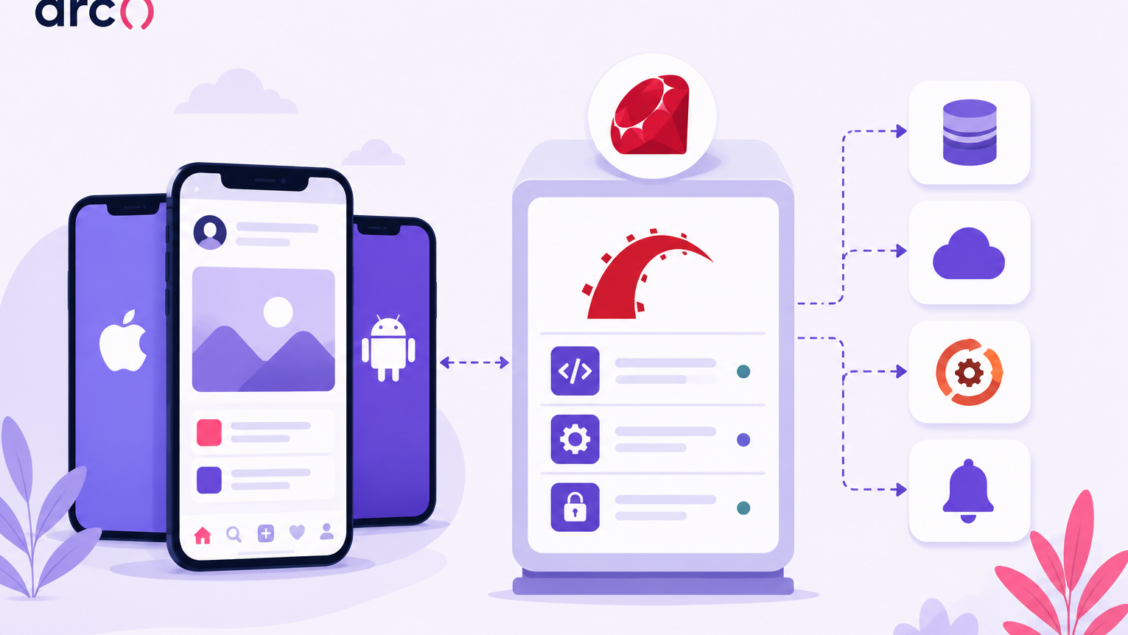
Your mobile app handles what users see and tap, while Rails handles everything behind the screen: your API, your database, your authentication, your business logic, and your background jobs. When a user opens an app, loads a feed, processes a payment, or receives a push notification, a backend like Rails makes it happen.
Rails works alongside Swift, Kotlin, React Native, or Flutter; it doesn’t replace them. If you’re a technical founder or engineering lead evaluating your mobile stack, the real question isn’t “can Ruby on Rails be used for mobile apps?” It’s “Should Rails be my mobile backend?” For data-driven apps where development speed matters, the answer is often yes.
The stakes are real at the market level, too, as the US mobile application market is on track to grow from $80.92 billion in 2025 to $141.54 billion by 2030, an 11.83% CAGR, which means the backend decisions made now are getting tested against a fast-growing, increasingly competitive user base, not a shrinking one.
What Rails Actually Does In A Mobile Stack
Rails sits on the server side of your Ruby on Rails mobile development architecture. It handles API requests, data storage, authentication, and business logic. Your native or cross-platform frontend handles everything the user sees and touches.
Backend Vs Frontend Responsibilities
Your mobile app and your Rails backend do completely different jobs. The mobile app (built in Swift, Kotlin, React Native, Flutter, or Expo) owns the user interface: screens, animations, gestures, local state, and device-specific features like camera access or GPS.
Rails owns everything else: your database, your authentication, your payments, and the rules that decide what data a user sees and what happens when they take an action. This is why one Rails backend can serve your iOS or Android app, and your web dashboard simultaneously, without changing a line of server code.
How Rails Serves iOS, Android, and Cross-Platform Clients
When you initialize a Rails project with the –api flag, Rails strips out everything it doesn’t need for API work: no views, helpers, templates, or asset pipeline. What’s left is a lean framework focused on routing, controllers, and JSON serialization.
A native iOS app built in Swift sends an HTTP request to your Rails API. Rails processes the request, queries PostgreSQL, and returns a JSON response. A Kotlin-based Android app does the same thing. A React Native or Flutter app does the same thing. The client doesn’t matter; the contract is the API. Rails doesn’t compete with Swift or Kotlin; it completes them.
Where APIs, Business Logic, And Data Sync Fit
Your Rails API acts as the single source of truth. Every mobile client reads from and writes to it. This matters for data consistency: if two users update the same record from different devices, Rails handles the conflict resolution, validation, and persistence. The mobile app sends the request and displays the result.
Business logic belongs in Rails, not in your mobile code. Pricing calculations, eligibility checks, permission rules, and workflow triggers should live on the server. If you put business logic in the mobile app, you push updates through app store review cycles. If it lives in Rails, you deploy a fix in minutes.
Mobile screens often need data from several unrelated queries at once: a user’s profile, their recent orders, and a personalized recommendation feed, for example. Running those queries sequentially adds up.
Active Record’s load_async lets you kick off multiple independent queries in parallel and block only when you actually need the results, which can meaningfully reduce response time on data-dense mobile endpoints without reaching for a separate concurrency library.
Background jobs round out the picture. When a user places an order, Rails queues a Sidekiq job to send a confirmation email, update inventory, and trigger a webhook to a third-party system. The mobile app gets a fast response while Rails handles the rest asynchronously.
Why Rails Works Well For Mobile Backends
Rails gives you a working API faster than most alternatives. Its conventions handle common decisions for you, and its gem ecosystem covers authentication, background jobs, real-time features, and data modeling out of the box. Many startups ship a working Rails API in a week or two.
Fast API Delivery And Convention Over Configuration
Rails’ “Convention over Configuration” philosophy means your team spends less time on folder structure, naming conventions, and boilerplate setup. A new Rails API project gives you a predictable structure from minute one. Every experienced Rails developer knows where the models, controllers, routes, and tests live.
You can scaffold a complete CRUD API for a resource in under a minute. Add serialization with a gem like jsonapi-serializer, and you return clean, structured JSON to your mobile clients immediately. You’re building features, not infrastructure.
Teams using Rails for their Ruby mobile app development consistently report faster time-to-market compared to setting up a Node.js or Go project from scratch, where you’re making dozens of architectural decisions before writing any business logic.
Authentication, Security, And Session Design
Mobile authentication differs from web authentication because you can’t rely on cookies. You need token-based auth, and Rails handles this well. Devise paired with devise-jwt gives you a production-grade authentication system that issues JSON Web Tokens on login and validates them on every request. OAuth 2.0 flows for social login (Google, Apple, GitHub) integrate cleanly. Session management stays stateless, which is exactly what mobile clients need.
Rails handles CORS configuration, so your API only accepts requests from authorized origins. Rate limiting protects against abuse. Rails’ built-in parameter filtering and CSRF protections, adapted for API mode, keep your endpoints locked down. If your app needs SOC 2 compliance, Rails’ mature security ecosystem gives you a strong starting point.
API Versioning And Backward Compatibility
Mobile apps create a problem web apps don’t have: you can’t force every user onto the latest version. Someone on an iPhone they haven’t updated in eight months might still be running a build from two years ago, hitting your current API. If you change a response shape or remove a field without a plan, you break an app you can’t immediately patch, since the fix has to clear app store review first.
The common approach is versioning your API explicitly, either through the URL (/api/v1/, /api/v2/) or an Accept header, and keeping old versions alive until usage drops to near zero. Rails doesn’t enforce a specific approach, but namespacing controllers by version (Api::V1::OrdersController) keeps the codebase manageable as versions accumulate. Plan for this from your first release, not after your first breaking change ships.
Token handling needs the same forward-looking treatment. A JWT issued at login shouldn’t live forever: build in refresh tokens, rotate them on use, and give yourself a way to revoke a token if a device is lost or compromised.
Some teams bind tokens to a specific device fingerprint, so a stolen token can’t be replayed from a different device. None of this is unique to Rails, but it has to be designed in from the start. Retrofitting token rotation after thousands of mobile clients are already holding long-lived tokens is a much harder migration than building it in from day one.
Async Work, Notifications, And Real-Time Features
Push notifications are non-negotiable for mobile apps, and your Rails backend triggers them. As of Rails 8, the default way to process notification jobs in the background is Solid Queue, a database-backed Active Job adapter that stores jobs in PostgreSQL or MySQL instead of requiring Redis.
Your API response stays fast while the notification goes out asynchronously, no separate Redis instance to provision or monitor. To send the actual push, pair Solid Queue with the rpush gem, which handles delivery to the Apple Push Notification service (APNs) for iOS and Firebase Cloud Messaging (FCM) for Android from a single Rails-side interface.
This same pattern applies to any async work: sending emails, processing image uploads, syncing data with third-party services, or running scheduled reports. Solid Queue is the right default for most mobile backends; teams running past roughly 10,000 jobs per minute or needing Redis-specific features can still drop in Sidekiq instead; Rails doesn’t force the choice.
For real-time features, Rails 8 also ships Solid Cable, a database-backed adapter for Action Cable that replaces Redis as the pub/sub layer for WebSockets. Chat messages, live updates, and order-tracking notifications all work without standing up a separate Redis or pub/sub service.
Solid Cable polls the database roughly every 100 milliseconds for new messages, which is fast enough for most mobile use cases; for thousands of concurrent WebSocket connections, AnyCable is the usual next step up.
This same pattern handles AI-powered features well. Rails can call an AI provider’s API and stream the response to the mobile client over Action Cable (via Solid Cable) as it arrives. Users see generated content appear progressively instead of waiting for the full response.
Data Modeling, Integrations, And Developer Productivity
Active Record is one of Rails’ strongest advantages for mobile backends. You define your data models in Ruby, and Active Record handles the SQL. Migrations make schema changes safe and repeatable. Associations between models (has_many, belongs_to, polymorphic) map directly to how mobile apps think about data.
The gem ecosystem fills in the rest. File uploads go through Active Storage, payment processing uses Stripe’s Ruby gem, and search runs through Elasticsearch or Meilisearch integrations. PDF generation, CSV exports, geolocation, image processing: there’s a maintained gem for almost every common mobile backend need.
Calling an AI provider’s API (OpenAI, Anthropic, or similar) is just another HTTP integration. Rails handles the request, manages rate limits and retries, and stores the result, the same way it handles any third-party service.
This reduces your total cost of ownership. You’re composing well-tested libraries into a backend that does exactly what your mobile app needs: fewer bugs, less technical debt, and a codebase that any experienced Rails developer can pick up quickly.
Common Architecture Patterns And Trade-Offs
The way you pair Rails with your mobile frontend shapes everything from team structure to deployment complexity.
Rails API With Native iOS And Android
This is the most traditional Ruby on Rails mobile development setup. Rails runs in API-only mode, serving JSON endpoints. Your iOS team builds in Swift, while your Android team builds in Kotlin. Both teams consume the same API.
The advantage is performance. Native apps have full access to device hardware, platform-specific UI components, and the smoothest animations. The trade-off is cost: you’re maintaining two separate frontend codebases and need developers skilled in each platform.
This pattern fits best when your app demands platform-specific polish: complex gestures, heavy use of camera or AR features, or pixel-perfect adherence to Apple’s and Google’s design guidelines. If you’re building a consumer app where user experience is the product, native frontends with a Rails API backend are a strong combination.
Rails API With React Native Or Flutter
A single cross-platform codebase talks to your Rails backend. React Native (JavaScript/TypeScript) or Flutter (Dart) lets one team ship to both iOS and Android. You’re hiring one frontend team instead of two. Bugs get fixed once, and both platforms ship at the same time. Your Rails API doesn’t change. It serves the same JSON regardless of what’s consuming it.
The trade-off is in edge cases. Cross-platform frameworks occasionally lag behind native platform updates. Performance-intensive features (heavy animation, video processing) may require dropping into native code.
GraphQL, Hotwire, And Turbo Native Options
GraphQL lets your mobile client request exactly the data it needs in a single query. Instead of hitting five REST endpoints to build one screen, you send one GraphQL query and get back a shaped response. Rails supports GraphQL through the graphql-ruby gem. This pattern works well when your mobile screens are data-dense, and your API would otherwise require many round-trip requests.
Turbo Native is a different approach. It wraps your existing Rails web views inside a native shell using Hotwire. Your Rails HTML templates become the mobile app’s UI, with no Swift or Kotlin required for most screens. Turbo Native suits internal tools, admin panels, or content-heavy apps where development speed matters more than native feel.
Rails 8 has improved Hotwire and Turbo integration, making Turbo Native more viable than it was a year ago. For consumer-facing apps where UI polish matters, a dedicated mobile frontend paired with a Rails API is still the better choice.
When To Split A Monolith Into Microservices
Almost every team that’s been through the microservices journey advises starting with a monolith. A single Rails app serving your mobile API is simpler to deploy, debug, and reason about. Split only when you have a concrete reason.
If one part of your system (real-time chat or ML inference, for example) has fundamentally different scaling or language requirements, extract it into its own service and keep the rest in Rails. Premature decomposition adds network complexity, deployment overhead, and debugging pain that a startup doesn’t need. Ship the monolith, scale it vertically, and with caching first, extract services when the data proves you need to.
Rails Vs. Node.js Vs. Phoenix Vs. Django For Mobile Backends
Rails isn’t the only reasonable choice for a mobile backend. Here’s how it stacks up against the three frameworks teams most often compare it to.
| Rails | Node.js | Phoenix (Elixir) | Django | |
| Concurrency model | Threaded, multi-process (Puma) | Single-threaded event loop, non-blocking | BEAM VM lightweight processes, massive concurrency | WSGI/ASGI, threaded or async |
| Best fit | Data-driven CRUD apps, fast MVP-to-production | High-concurrency I/O, persistent connections | Real-time at scale: chat, live dashboards, multiplayer | Data-heavy, admin-heavy, security-sensitive apps |
| Real-time support | Action Cable / Solid Cable, solid for moderate scale | Native WebSocket support, widely used for real-time | Channels + PubSub, built for very high concurrency | Django Channels, workable but less central to the framework |
| Ramp-up speed | Fast — convention over configuration | Fast if team already knows JS | Slower — functional paradigm, smaller talent pool | Fast — “batteries included,” similar philosophy to Rails |
| Talent pool | Large, mature, 20+ years | Very large, JS-unified across stack | Smaller, growing | Large, especially where Python is the team’s primary language |
For most mobile backends, the deciding question isn’t “which is fastest”, as all four can serve a mobile API well below the traffic levels where raw throughput becomes the bottleneck. It’s whether your product needs Phoenix’s concurrency ceiling (thousands of simultaneous WebSocket connections, true real-time at scale) or whether Rails, Node, or Django’s faster path to a working product matters more.
If your roadmap doesn’t include massive real-time concurrency, Rails’ convention-driven speed and mature ecosystem make it hard to beat for getting a mobile backend into production fast.
Performance, Scalability, And Operations
A Rails mobile backend can handle millions of requests, but only if you set up caching, database scaling, background processing, and monitoring correctly from the start.
Caching, Database Scaling, And Read Patterns
Most mobile API requests are reads: a user opens the app, loads a feed, checks a profile, or browses a catalog. Caching these responses eliminates redundant database queries and cuts response times. Use Redis or Memcached for fragment caching and low-level caching in Rails. Cache serialized JSON responses for endpoints that don’t change on every request, and set expiration based on how often your data actually changes.
On the database side, PostgreSQL handles most mobile app workloads well. When read traffic outpaces what a single database can serve, add read replicas. Route write queries to the primary database and read queries to replicas. Rails 6 and above support multi-database configurations natively, making this straightforward.
A CDN in front of your API handles static assets and cacheable responses at the edge, reducing latency for users in different regions. For a global user base, this single addition can cut perceived load times significantly.
Background Processing And Traffic Spikes
Solid Queue is the standard for background job processing in Rails 8 and the default for most mobile backends. Every task that doesn’t need to happen during the API response (sending emails, processing uploads, syncing third-party data, generating reports) goes into a background job.
For traffic spikes (a product launch, a viral moment, a marketing push), Solid Queue’s concurrency model, built on PostgreSQL or MySQL’s FOR UPDATE SKIP LOCKED, handles meaningfully high throughput without an extra service to operate. You scale by adding more worker processes, the same as you would with Sidekiq.
If your job volume is high enough that Redis-backed throughput genuinely matters (sustained loads past roughly 10,000 jobs/minute), Sidekiq remains a solid upgrade path, and the two can coexist if you migrate gradually. Combine this with autoscaling on your hosting platform (AWS ECS, Render, or similar), and your backend can absorb spikes without degrading the mobile experience.
Deployment, CI/CD, And Observability
Automate your deployments from day one. A CI/CD pipeline using GitHub Actions runs your test suite, checks for security vulnerabilities with Dependabot, and deploys to staging and production on merge.
Observability means knowing what’s happening inside your app before users complain. Use PgHero to monitor slow PostgreSQL queries. Use Bullet in development to catch N+1 queries before they reach production. Application performance monitoring (New Relic, Datadog, or Scout) gives you request-level visibility into response times and error rates.
Rails 8 ships with Kamal 2 in every new app by default, a Docker-based deployment tool from 37signals that handles zero-downtime deploys, automated SSL via Let’s Encrypt, and multi-app hosting on a single server, without requiring Nginx or a separate reverse proxy (Kamal includes its own, Kamal Proxy).
For a mobile backend that just needs to run reliably on one or two servers, kamal deploy is often the fastest path from a working app to a production API. Teams with a need for managed container orchestration at scale still reach for AWS ECS or Kubernetes, but Kamal closes the gap for everyone below that scale who previously had to choose between Heroku’s cost and Kubernetes’ complexity.
Heroku still works well for early-stage apps that want zero infrastructure management. As you scale past what Kamal-managed servers comfortably handle, AWS ECS or Kubernetes gives you more control over container orchestration, autoscaling, and cost. Match your deployment complexity to your actual traffic, not your projected traffic.
Testing And Load Validation
RSpec or Minitest should cover your API endpoints, model validations, and business logic. Write request specs that test the full cycle: send a request, verify the response status, and check the returned JSON.
Before a major launch, run load tests with JMeter or a similar tool. Simulate the number of concurrent users you expect and watch how your API responds. Identify bottlenecks (slow queries, memory leaks, connection pool exhaustion) under load, not in production. A single endpoint might pass all its specs but fail at 500 concurrent requests because of an unindexed database column. Find those issues in staging.
Real-World Ruby On Rails Application Examples And Decision Criteria
Several well-known mobile products run on Rails backends, and the pattern works best for specific app types. Knowing where Rails fits and where it doesn’t saves you from expensive rewrites.
Ruby On Rails Application Examples In Mobile
Shopify’s mobile app processes billions of dollars in transactions on a Rails backend. The app handles product management, order processing, analytics, and notifications, all powered by a Rails API serving millions of merchants.
Airbnb built its early product on Rails and continued using it as the backend for its mobile apps through years of rapid growth. The API powered search results, booking flows, and messaging for iOS and Android.
GitHub’s mobile app lets you review pull requests, manage issues, and browse repositories. A Rails application serves the API behind it and powers the web interface simultaneously.
Basecamp, the project management tool that DHH built alongside Rails itself, has native mobile apps backed by the same Rails backend that runs the web version.
Best-Fit App Types For A Rails Backend
Rails works best as a mobile backend for data-driven applications. Marketplaces, SaaS products, e-commerce apps, social platforms, and content-heavy apps all map well to Rails’ strengths: relational data modeling, API delivery, authentication, and background processing.
If your mobile app is primarily about creating, reading, updating, and displaying structured data, Rails is a natural fit. Apps that need to ship fast benefit the most. If you’re validating a mobile product before committing to a larger architecture, Rails gives you a production-quality backend in a fraction of the time other frameworks require.
When Rails Is The Wrong Choice
Rails isn’t the right choice for every mobile backend. Three cases stand out:
- Real-time multiplayer games with sub-10ms latency requirements. Rails’ request-response cycle, even with Action Cable or Solid Cable, adds overhead that game servers written in C++ or Rust don’t have.
- Heavy machine learning inference on every request (image classification, real-time recommendations at massive scale). This doesn’t belong in a Rails process; you need a Python or Go service for that workload. You can still use Rails for the rest of the backend and call the ML service from Rails when needed; Rails handles auth, data, and orchestration, while the AI service handles inference.
- Offline-first apps with complex local data sync: field service tools used in areas with no connectivity, for example, require specialized sync engines. Rails can be one part of that stack, but it won’t solve the hard sync problems on its own.
How To Evaluate Team Fit, Hiring Risk, And Long-Term Cost
Your backend choice only works if you can hire and retain developers who know it. Rails has a large, experienced talent pool, so finding senior Rails developers who’ve built APIs for mobile apps is realistic, especially compared to newer frameworks where the pool is thinner.
Total cost of ownership goes beyond developer salaries. Rails’ convention-based structure helps new team members onboard faster. The DRY principle reduces code duplication, which cuts the bug count over time. Strong testing culture (RSpec is nearly universal in Rails projects) catches regressions before they ship. For a small team building a mobile backend quickly, Rails’ productivity advantage translates directly to lower engineering costs and faster delivery.
The long-term risk isn’t “will Rails still be supported?” Rails 8 shipped with significant improvements, and the framework’s 20-year track record of active development answers that question. The risk is hiring generalists who’ve only built web apps and expecting them to design mobile APIs well.
You have to vet specifically for mobile backend experience, and increasingly, for experience integrating AI features into that backend. A developer who’s only called REST endpoints for CRUD operations may not know how to handle streaming responses, token-based rate limits, or retry logic for an AI provider’s API.
Frequently Asked Questions
Can I use Ruby on Rails for mobile app development?
Yes. Rails is one of the most proven backend frameworks for mobile apps. It doesn’t run on the device; it runs on the server, handling your API, database, authentication, and business logic. Your mobile frontend (Swift, Kotlin, React Native, or Flutter) communicates with Rails over HTTP. Companies like Shopify, GitHub, and Airbnb have run Rails backends serving millions of mobile users for years.
What is the difference between Ruby on Rails for web vs mobile development?
For web apps, Rails renders HTML views on the server and delivers complete pages to the browser. For Ruby on Rails mobile development, Rails runs in API-only mode: it strips out views entirely and returns JSON responses that your mobile client consumes. The underlying framework is the same, but the output and the client are different.
Does Rails support REST API and GraphQL for mobile apps?
Yes to both. REST is the default and the simpler starting point, and Rails’ routing and controller conventions are built around it. GraphQL is available through the graphql-ruby gem and suits mobile clients that need to fetch data from multiple related resources in a single request. Most apps start with REST and move to GraphQL only when the API requires it.
What are some examples of mobile apps built with Ruby on Rails backends?
Shopify, Airbnb, GitHub, and Basecamp all use or have used Rails as the backend powering their mobile apps. These Ruby on Rails application examples span e-commerce, travel, developer tooling, and project management; different product categories, same backend architecture pattern.
Should I use Rails or Node.js for my mobile app backend?
Rails is the better choice if your team knows Ruby, you need to ship fast, and your app is built around structured data and business logic rather than real-time interaction. Node.js is worth considering if your app requires very high concurrency with persistent connections (real-time multiplayer, live streaming) or if your team is stronger in JavaScript and prefers a unified language across frontend and backend.
How do I connect a Ruby on Rails API to an iOS or Android app?
Initialize your Rails project with the –api flag. Define your routes, controllers, and serializers. Your iOS app (Swift) or Android app (Kotlin) makes HTTP requests to your Rails endpoints using URLSession or Retrofit, respectively. Add devise-jwt for token-based authentication. Your mobile app sends the JWT in the Authorization header on every authenticated request.
Is Ruby on Rails good for real-time mobile features?
Rails supports real-time features through Action Cable, which provides WebSocket connections directly in the framework. It works well for notifications, activity feeds, chat, and order tracking. For very high concurrency (thousands of simultaneous WebSocket connections), you may need to scale Action Cable carefully or evaluate a dedicated real-time service. For most mobile products, Action Cable covers the real-time requirements without adding infrastructure complexity.
Don’t Hire a Web Developer for a Mobile Backend
Everything above gets you to the real decision: Rails is a strong mobile backend choice if your team can actually execute on it well. That’s the harder problem in practice. A Rails generalist who’s only built marketing sites or basic CRUD apps won’t necessarily know how to design a mobile-specific API, handle token rotation, or wire push notifications through Solid Queue.
If you’re hiring for this, the question to ask isn’t just “do you know Rails,” but “have you built an API consumed by a native or cross-platform mobile client, and what did you do differently because of it?”
Arc pre-vets Ruby on Rails developers for domain expertise and English fluency before you see a profile. When you post a role, HireAI matches you with a shortlist from 450,000+ vetted developers in seconds, without job ads, a resume pile, or manual screening.
Every Rails developer has been vetted for domain expertise, including API design and mobile backend patterns. You hire 75% faster. You pay $0 until you hire.