


Most Angular developers can recite the Angular lifecycle hooks in order in their sleep: Constructor, ngOnChanges, ngOnInit, and so on. The problems start once you’re past a single component and into a real tree, 15 or 20 components deep, some on OnPush, some wrapped in conditionals, all of them pulling from the same handful of services.
That’s when a subscription you forgot to clean up keeps running after its component is gone. A parent reads loading state before any of its children have actually fetched anything. An object input gets mutated in place, so Angular never notices the change. None of this is in the docs because it’s a property of how hooks interact once there’s a tree, shared state, and async data all moving at once.
So this isn’t a hook-by-hook reference. If you want to know what ngOnInit does, the Angular docs already cover that well. What follows is where each of these patterns actually breaks in production, and what to do instead.
In this guide:
- Angular lifecycle hooks: execution order and when to use each
- Where lifecycle logic starts failing in real component trees
- Initialization boundaries that prevent early-state bugs
- Input-driven state without reference-check surprises
- Rendering timing, child components, and conditional UI
- Cleanup patterns that stop leaks and zombie subscriptions
- Change detection strategies that make or break hook safety
- FAQ
Angular Lifecycle Hooks: Execution Order and When to Use Each
| Hook | When it fires | Typical use |
| constructor | Class instantiation before inputs are set | Dependency injection only; store service references |
| ngOnChanges | Before ngOnInit, then on every input reference change | React to input changes; compute derived state from inputs |
| ngOnInit | Once, after first ngOnChanges (or directly if no inputs) | HTTP calls, subscriptions, computed state based on inputs |
| ngDoCheck | Every change detection cycle, after ngOnChanges/ngOnInit | Manual dirty-checking when reference equality isn’t enough |
| ngAfterContentInit | Once, after projected content is initialized | Read or react to content children for the first time |
| ngAfterContentChecked | After every check of projected content | Rarely needed; avoid writing state here |
| ngAfterViewInit | Once, after the component’s view and child views are initialized | Access ViewChild references; measure DOM dimensions |
| ngAfterViewChecked | After every check of the component’s view | Rarely needed; never write state here |
| afterNextRender | Once, after the next browser render cycle | Access DOM measurements safely after SSR hydration; one-time third-party library setup |
| afterRender | After every browser render cycle | Sync external state (canvas, charts) that needs to reflect every render |
| ngOnDestroy | Just before Angular destroys the component | Clean up subscriptions, timers, event listeners |
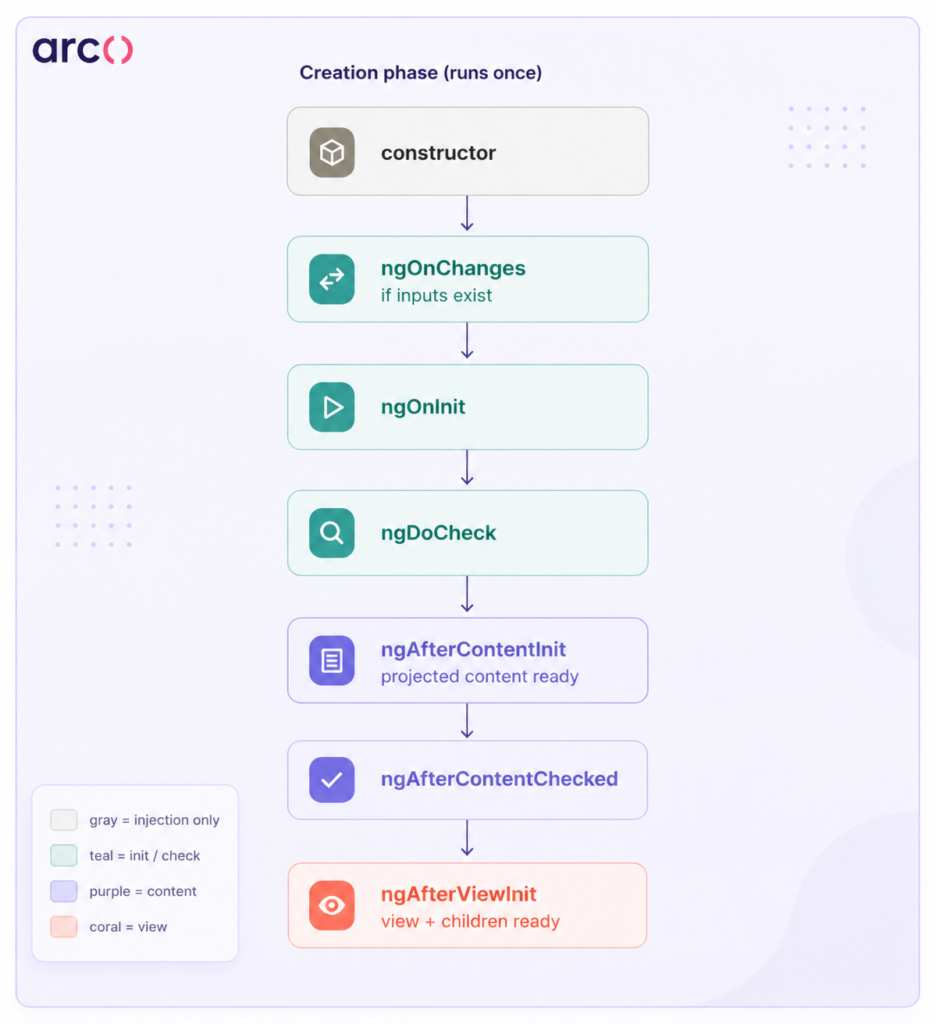
Execution order — one creation cycle:
constructor
→ ngOnChanges (if inputs exist)
→ ngOnInit
→ ngDoCheck
→ ngAfterContentInit
→ ngAfterContentChecked
→ ngAfterViewInit
→ ngAfterViewChecked
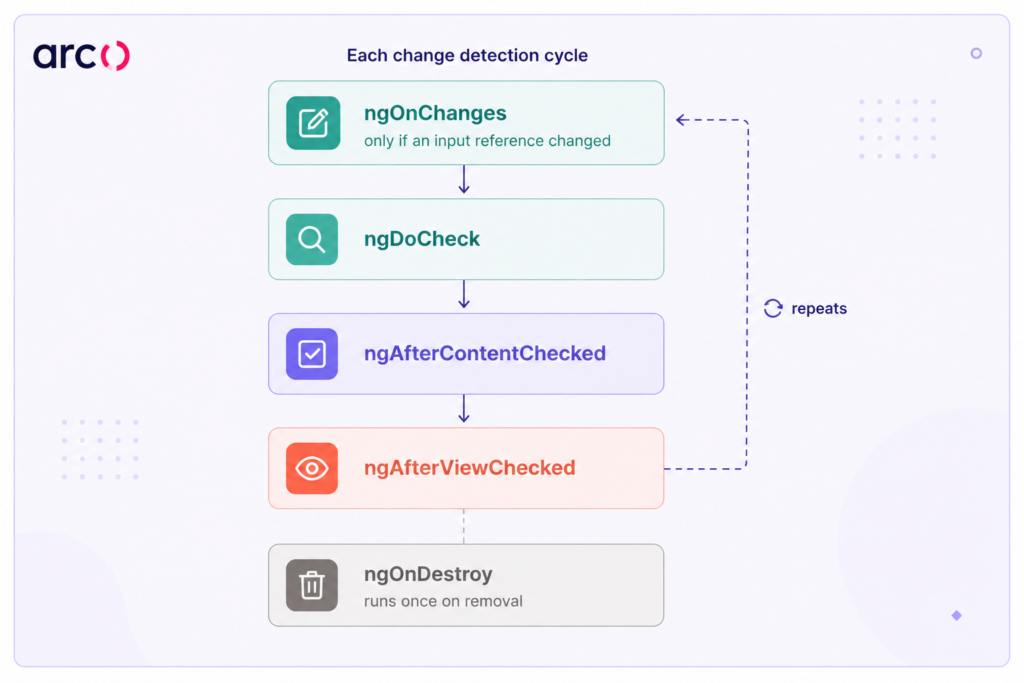
On subsequent change detection cycles (not creation), only these run:
ngOnChanges (if an input reference changed)
→ ngDoCheck
→ ngAfterContentChecked
→ ngAfterViewChecked
Parent/child ordering — worth knowing before reading the patterns below:
Parent constructor → Child constructor
Parent ngOnInit → Child ngOnInit
Child ngAfterViewInit → Parent ngAfterViewInit (bottom-up)
One thing worth knowing: directives have lifecycle hooks too, and they follow the same sequence. A directive on a host element runs its ngOnInit after the host component’s ngOnChanges but before the host’s ngAfterViewInit, which matters if a directive and its host component are both reading the same DOM state on init.
Where Lifecycle Logic Starts Failing In Real Component Trees
Most lifecycle bugs come from hook logic spread across multiple components in a tree, interacting with shared services and change detection in ways no one planned for.
Shared State Across Hooks
Picture a dashboard component with three child widgets. Each widget calls a shared DataService inside its own ngOnInit, triggering three separate HTTP requests to the same endpoint. The parent component also subscribes to the service’s state in its ngOnInit to show a loading spinner.
Here’s where it bites you: the parent’s ngOnInit fires before the children’s. So the parent reads the service state before any child has triggered a fetch. The spinner never shows. If the service uses a BehaviorSubject, each child subscription also replays the last emitted value, causing stale data to flash before the real response arrives.
Move the data-fetching responsibility to the parent and pass the results down as @Input() bindings. Children become pure display components that react to inputs, not shared service state.
Why Change Detection Multiplies Small Mistakes
A single object mutation inside ngDoCheck or ngAfterViewChecked might seem harmless on its own. But Angular traverses the component tree top-down, and every component with that hook defined gets called on every change detection cycle. In development mode, Angular runs change detection twice to catch ExpressionChangedAfterItHasBeenCheckedError.
If your ngAfterViewChecked updates a property bound in the template, you’ll hit that error directly. In production, it just causes double rendering. Multiply that across ten components, and you’ve got a performance problem that’s invisible in profiling, because no single component looks slow on its own.
A Senior Rule For Keeping Components Predictable
A component should only modify its own state in ngOnInit or ngOnChanges, never in the “after” hooks. The “after” hooks (ngAfterViewInit, ngAfterViewChecked, ngAfterContentInit, ngAfterContentChecked) exist for reading state, not writing it. If you need to write state based on a view query result, defer it with a microtask or use afterNextRender.
// Bad: state change in ngAfterViewInit triggers ExpressionChangedAfterItHasBeenCheckedError

ngAfterViewInit() {

  this.chartHeight = this.chartContainer.nativeElement.offsetHeight;

}

// Good: defer the write

constructor() {

  afterNextRender(() => {

    this.chartHeight = this.chartContainer.nativeElement.offsetHeight;

  });

}
Angular 17+ also ships afterRender for cases where you need to run after every render cycle, not just the next one. It’s useful for keeping a canvas or third-party chart in sync with the component state on every update, not just during initialization.
Initialization Boundaries That Prevent Early-State Bugs
The line between the constructor and ngOnInit is blurry in tutorials but critical in production. Getting it wrong causes race conditions, undefined input values, and HTTP requests that fire before your component knows what to fetch.
What Belongs In The Constructor Versus Startup Logic
The constructor runs when Angular instantiates the class. At this point, @Input() values haven’t been set yet. Dependency injection is complete, so you can call inject() and store service references. That’s all the constructor should do.
ngOnInit runs after Angular has assigned all initial input values. This is where your startup logic belongs: HTTP calls, computed state from inputs, and initial subscriptions.
Here’s the bug that actually shows up: a developer injects ActivatedRoute in the constructor and immediately reads snapshot.params to fetch data. Works fine in simple cases. But if the same component gets reused across routes, which is common in tab layouts, the constructor doesn’t re-run on navigation. The component shows stale data because the fetch was tied to the constructor instead of a subscription to paramMap inside ngOnInit.
Async Setup Races In Data-Heavy Screens
Consider a reporting screen where ngOnInit kicks off two parallel API calls: one for report metadata, one for chart data. A third call depends on the metadata result.
ngOnInit() {

  this.metaSub = this.reportService.getMeta(this.reportId).subscribe(meta => {

    this.meta = meta;

    this.chartSub = this.reportService.getChart(meta.chartId).subscribe(chart => {

      this.chart = chart;

    });

  });

}
If the component gets destroyed mid-flight, say the user navigates away before the metadata call resolves, this.chartSub never gets assigned. ngOnDestroy has nothing to clean up. The inner subscription becomes a zombie that keeps running after its component is gone.
Flatten the chain with RxJS operators and use a single teardown mechanism instead:
private destroyRef = inject(DestroyRef);

ngOnInit() {

  this.reportService.getMeta(this.reportId).pipe(

    switchMap(meta => this.reportService.getChart(meta.chartId)),

    takeUntilDestroyed(this.destroyRef)

  ).subscribe(chart => this.chart = chart);

}
Constructor Vs Startup Responsibilities
| Responsibility | Constructor | ngOnInit |
| Dependency injection (inject()) | Yes | Yes, but prefer constructor |
| Reading @Input() values | Not available yet | Available |
| Setting up DestroyRef callbacks | Yes | Yes |
| HTTP calls based on input data | Inputs are undefined | Correct place |
| Registering afterNextRender | Yes, required here | Too late for injection context |
| Route param subscriptions | May miss re-navigation | Correct place |
| Simple property defaults | Yes | Unnecessary here |
Input-Driven State Without Reference-Check Surprises
ngOnChanges only fires when Angular detects that an @Input() binding has changed. Angular checks by reference, not by deep equality. That single fact causes more subtle bugs than any other lifecycle behavior.
Nested Objects And Arrays That Don’t Trigger Expected Updates
Your parent component has a filters object passed to a child:
// Parent updates a property on the existing object
this.filters.status = ‘active’;
The child’s ngOnChanges never fires. Angular sees the same object reference and skips the check entirely. The child keeps rendering stale data, often for a while before anyone notices.
This is the most common lifecycle bug you’ll find in data table components, filter panels, and anything that receives a configuration object as input.
Defensive Patterns For Derived State And Immutable Inputs
Fix it at the assignment boundary. When you update an object input, create a new reference instead of mutating the old one:
// Parent: create a new reference

this.filters = { ...this.filters, status: 'active' };
If you’re building a shared component and can’t trust consumers to pass new references, defend with ngDoCheck:
private lastStatus: string;

ngDoCheck() {

  if (this.filters?.status !== this.lastStatus) {

    this.lastStatus = this.filters.status;

    this.recomputeRows();

  }

}
This costs performance, so reserve it for component library code where you don’t control the consumer. In application code, just enforce immutable input patterns through code review.
Reactive Form Scenarios That Hide Stale Input State
Angular reactive forms introduce their own version of this problem. Say a form editor component receives a FormGroup as an @Input():
@Input() form!: FormGroup;
The parent resets form values with this.form.patchValue({…}). The child’s ngOnChanges doesn’t fire, because the FormGroup reference never changed. If the child was computing derived state in ngOnChanges, like toggling field visibility based on a form value, that state is now stale, and nothing will tell you.
Subscribe to the form’s valueChanges inside ngOnInit instead of relying on ngOnChanges, and clean it up with takeUntilDestroyed.
ngOnInit() {

  this.form.valueChanges.pipe(

    takeUntilDestroyed(this.destroyRef)

  ).subscribe(val => this.visible = val.type === 'advanced');

}
Now your derived state tracks the actual data stream instead of a lifecycle hook that may never fire.
Rendering Timing, Child Components, And Conditional UI
View-related hooks run after the template has been processed, but “after” doesn’t mean everything is guaranteed to exist. Conditional rendering and dynamic children create timing gaps that break ViewChild access and layout logic.
Parent-Child Ordering Problems In Dashboard And Widget Layouts
Angular initializes components top-down. A parent’s ngOnInit fires before any child’s ngOnInit. But ngAfterViewInit fires bottom-up: children finish their view init before the parent’s ngAfterViewInit runs.
In a dashboard with card widgets, that looks like this:
- Parent ngOnInit → Child A ngOnInit → Child B ngOnInit
- Child A ngAfterViewInit → Child B ngAfterViewInit → Parent ngAfterViewInit
If your parent reads child dimensions in ngAfterViewInit, you’re fine, the children’s views are ready by then. But if a child emits an event during its own ngAfterViewInit that triggers a state change in the parent, you’ll get ExpressionChangedAfterItHasBeenCheckedError.
ViewChild Access Bugs Around ngAfterViewInit
The classic version of this bug: you grab a @ViewChild reference and try to use it in ngOnInit. It’s undefined because the view hasn’t initialized yet.
@ViewChild('chart') chartRef!: ElementRef;

ngOnInit() {

  // BUG: chartRef is undefined here

  this.chartRef.nativeElement.style.height = '400px';

}
Moving it to ngAfterViewInit usually fixes this. But if the element sits inside an @if block, even ngAfterViewInit won’t help, because the element doesn’t exist in the DOM at all if the condition is false at init time.
// Template: @if (showChart) { <canvas #chart></canvas> }

ngAfterViewInit() {

  // chartRef is STILL undefined if showChart is false at init time

}
Use a setter-based ViewChild or pair { read: ElementRef } with afterNextRender to defer access until the element actually lands in the DOM.
How Angular Control Flow Changes Timing Assumptions
The newer Angular control flow syntax (@if, @for, @switch) replaces structural directives like *ngIf. The lifecycle behavior is largely the same: components inside @if blocks get created and destroyed as the condition changes, running their full lifecycle sequence each time.
Here’s the part that catches people off guard. @for with track can reuse component instances when items get reordered. That means ngOnInit doesn’t re-fire for a reused component, but ngOnChanges still does. If your setup logic in ngOnInit assumes a fresh start every time, a reused component will carry stale state forward without warning you.
Test your components against both creation and reuse scenarios whenever you’re using @for with a track-by-identity strategy.
Cleanup Patterns That Stop Leaks And Zombie Subscriptions
Every observable subscription created in a component has to be torn down when that component is destroyed. Simple in theory. In practice, this is the single most common source of memory leaks in Angular apps.
Why Manual Unsubscribe Logic Fails At Scale
The manual pattern stores each subscription and calls unsubscribe() in ngOnDestroy:
private sub1!: Subscription;

private sub2!: Subscription;

ngOnDestroy() {

  this.sub1?.unsubscribe();

  this.sub2?.unsubscribe();

}
It works until it doesn’t. Developers forget to add new subscriptions to the list. Conditional subscriptions created inside callbacks may never get assigned to a tracked variable at all. And the boilerplate piles up fast enough to bury the actual business logic underneath it.
Using DestroyRef and takeUntilDestroyed As The Default Pattern
takeUntilDestroyed from @angular/core/rxjs-interop should be your default. It ties an observable’s lifecycle directly to the component’s destruction, no manual tracking required.
private destroyRef = inject(DestroyRef);

ngOnInit() {

  this.dataService.getItems().pipe(

    takeUntilDestroyed(this.destroyRef)

  ).subscribe(items => this.items = items);

  this.route.paramMap.pipe(

    takeUntilDestroyed(this.destroyRef)

  ).subscribe(params => this.loadItem(params.get('id')));

}
Apply this same pattern to every subscription in the component. If you call takeUntilDestroyed() without arguments inside a constructor, it automatically captures the injection context for you.
Checklist: Where Cleanup Logic Actually Belongs
- Observable subscriptions → takeUntilDestroyed(this.destroyRef) piped onto every .subscribe()
- Event listeners added via Renderer2 or native DOM → DestroyRef.onDestroy() callback
- setInterval / setTimeout → Store the ID, clear it in DestroyRef.onDestroy()
- Third-party library instances (charts, maps) → Call their .destroy() method in DestroyRef.onDestroy()
- WebSocket connections → Close in DestroyRef.onDestroy()
- Form value subscriptions → takeUntilDestroyed, same as any other observable
If you open it, close it. If you subscribe to it, unsubscribe from it. DestroyRef is the one mechanism, so cleanup logic lives right next to the setup logic that needs it.
Change Detection Strategies That Make Or Break Hook Safety
Default change detection checks every component on every cycle. OnPush restricts checks to components whose inputs have changed or that have been explicitly marked dirty. That changes which lifecycle hooks fire and when, more than most teams realize going in.
What OnPush Invalidates About Common Lifecycle Assumptions
With OnPush, ngDoCheck still fires on every parent change detection cycle, even when the component’s own inputs haven’t changed. That trips people up, because OnPush sounds like it should mean “nothing runs unless inputs change.”
But ngOnChanges only fires when an input reference actually changes, and template bindings only re-evaluate during a check cycle that OnPush permits. So if you mutate an object passed as input without changing the reference, the component won’t re-render, ngOnChanges won’t fire, but ngDoCheck runs anyway.
That gap matters. An OnPush component running ngDoCheck logic that updates internal state can end up with state that’s out of sync with what’s on screen, and the template won’t catch up until something else triggers a check.
Designing Shared Components For An Angular Component Library
If you’re building components for an Angular component library, you can’t assume consumers will use Default or OnPush. Your components need to behave correctly under both.
A few rules worth holding to:
- Don’t rely on ngDoCheck for rendering state. Use signals or call ChangeDetectorRef.markForCheck() explicitly instead.
- Treat inputs as immutable. Document that object inputs must be replaced, never mutated, and hold consumers to it.
- Use OnPush inside your library components. It forces you to handle change detection on purpose, which beats relying on Default’s aggressive checking to paper over gaps.
- Don’t write state in ngAfterViewChecked. It fires too often under Default and not reliably enough under OnPush to be safe either way.
Key Takeaways For Architecture-Safe Component Design
| Principle | What It Means In Practice |
| Inputs are immutable contracts | Always create new references. Never mutate input objects. |
| Startup logic lives in ngOnInit, not the constructor | Constructor is for injection only. |
| “After” hooks are read-only | Never write component state in ngAfterViewInit or ngAfterViewChecked. |
| DestroyRef + takeUntilDestroyed replaces manual cleanup | One pattern for every subscription and side effect. |
| OnPush is the safe default | Design components to work under OnPush from the start. |
| Library components must be defensively coded | Assume nothing about the consumer’s change detection or input mutation habits. |
A note on where this is heading: Angular’s signals model is gradually shifting how much lifecycle hook logic you actually need. Signal inputs update reactively without ngOnChanges, computed() replaces derived state you’d previously calculate in ngOnInit or ngDoCheck, and effects() cover side effects that would have lived in ngAfterViewInit.
The hooks aren’t going away (ngOnInit for one-time setup, DestroyRef for teardown, and the view/content hooks for DOM timing still have no signal equivalent), but the trend is toward less lifecycle logic, not more. If you’re starting a new component today, it’s worth asking whether a signal would handle the reactivity before reaching for a hook.
Frequently Asked Questions
Do I still need lifecycle hooks if I’m using signals?
Signals reduce how much you lean on ngOnChanges and ngDoCheck for reacting to input changes, since a signal input updates reactively without a manual check. You still need ngOnInit for startup logic that isn’t purely reactive (initial HTTP calls, one-time setup), and you still need ngOnDestroy or DestroyRef for teardown. Signals replace some lifecycle logic, not all of it.
Do lifecycle hooks behave differently in a standalone component versus one declared in an NgModule?
No. The hook order and timing are identical either way. The only thing that changes is how dependencies get into the component (imports array versus a module’s declarations and providers), which doesn’t touch the lifecycle sequence at all.
How do you test ngOnDestroy without spinning up a full TestBed render?
Call fixture.destroy() in your test instead of relying on Angular to destroy the component naturally. This triggers ngOnDestroy and any DestroyRef.onDestroy() callbacks immediately, so you can assert that subscriptions were actually torn down rather than just trusting that the cleanup code runs in production.
The Pattern Behind All of These Bugs
Most of the bugs in this guide trace back to one of three things: state written somewhere it shouldn’t be, a reference comparison that didn’t account for mutation, or a subscription with no clear owner for its teardown. Fix those, and most lifecycle bugs that show up in code review stop appearing at all.
That’s also a reasonable way to evaluate whether someone actually knows Angular at a senior level. Anyone can name the hooks in order, but far fewer people can explain why a dashboard’s loading spinner never fires or why a reused @for row carries state from three items ago. If you’re hiring, that’s the question worth asking in the interview instead of “what does ngOnInit do.”
If you’re preparing for an Angular interview, the same three failure modes are worth being able to explain with a real example: a zombie subscription you had to hunt down, a component that wasn’t updating because an object input was being mutated in place, or an ExpressionChangedAfterItHasBeenCheckedError you traced back to state being written in an “after” hook.
Any of those answers signals the same thing from the other side of the table: that you’ve debugged a real component tree, not just read the docs.
If you’re hiring: lifecycle architecture is one of the clearest signals of Angular seniority, and one of the easiest to screen for badly. A candidate who can recite hook order isn’t the same as a candidate who’s debugged a zombie subscription in a 40-component tree at 2 am.
Arc’s vetted Angular developers have already been screened against real architectural problems, not just trivia. Browse matched candidates in minutes and save up to 58% vs traditional hiring.