



Written for SvelteKit 2.70.x and Svelte 5.57, the current stable lines as of writing. Code examples use Svelte 5 runes and SvelteKit 2 load APIs.
Most SvelteKit tutorials stop at components, stores, and routing. They rarely show what happens when a marketing team needs to publish a blog post, an editor needs to preview a draft that isn’t live yet, and the site needs to reflect that change within a minute of hitting publish. That gap is where most content projects stall.
If your project still runs Svelte 4 reactivity ($: labels, export let props), the load-function patterns below still apply, but component syntax will differ; our guide to Svelte 5 and runes covers that migration. SvelteKit 3 has been in release candidate since August 13, 2026, and requires Svelte 5. Load functions, page options, and the preview and webhook flow carry forward. One pattern this article uses does not: SvelteKit 3 deprecates the $env/* modules, including $env/static/private, and they will be removed in SvelteKit 4.
In their place, you declare explicit environment variables in src/env.ts and import them from $app/env/private or $app/env/public. To migrate an existing app, run npx sv@next migrate sveltekit-3. It rewrites what it can and generates a TODO list for the rest. Plan a manual pass on service workers (the $service-worker module is gone) and on handleError, which now receives expected errors too. The SvelteKit 3 migration guide lists every change.
Pairing a headless CMS with SvelteKit gives you a production architecture where editors own content, developers own presentation, and each page picks its own rendering mode based on how often the content changes. That combination is what makes Svelte viable for marketing sites, documentation, blogs, and e-commerce content, not just single-page app demos.
By the end, you will be able to pick a CMS with your integration constraints in mind, decide which load function fetches what, choose prerendering versus server rendering per route, and wire previews and rebuilds so publishing works the first time.
In this guide:
- What a headless architecture changes in a SvelteKit site
- Choose the right rendering mode for each content type
- Build a reliable content loading layer
- Design an editorial workflow that supports safe publishing
- Make SvelteKit content sites easier to operate at scale
- Frequently asked questions
- A practical path to a maintainable content platform
What a headless architecture changes in a SvelteKit site
A headless setup moves your content out of the repository and into an API, which changes where data enters your app and who can change it without a deploy. Your Svelte components stop being the source of truth for copy, and your CMS stops having any opinion about HTML.
Where content lives and how the frontend receives it
Content lives in the CMS as structured entries: fields, references, and assets. SvelteKit receives it as JSON over a content delivery API, usually REST or GraphQL, sometimes a query language like GROQ.
Three practical consequences:
- Editors work in a UI. A content marketer changes a headline without a pull request, a build, or a developer.
- Your components consume a contract, not a file. A BlogPost component reads title, body, author, and heroImage fields. Rename a field in the CMS and every page using it breaks.
- Assets come from the CMS image CDN. You build URLs with query parameters (?w=1200&fm=webp&q=75) instead of importing local files, so Vite never sees them and never optimizes them for you.
The request path from CMS entry to rendered page
Trace one page request and the whole architecture becomes clear:
- A visitor hits /blog/hiring-remote-engineers.
- SvelteKit matches src/routes/blog/[slug]/+page.server.ts.
- The server load function calls the CMS content delivery API with your read token and the slug.
- The CMS returns JSON. Your code maps it into a typed object.
- SvelteKit renders +page.svelte on the server, streams HTML, then hydrates.
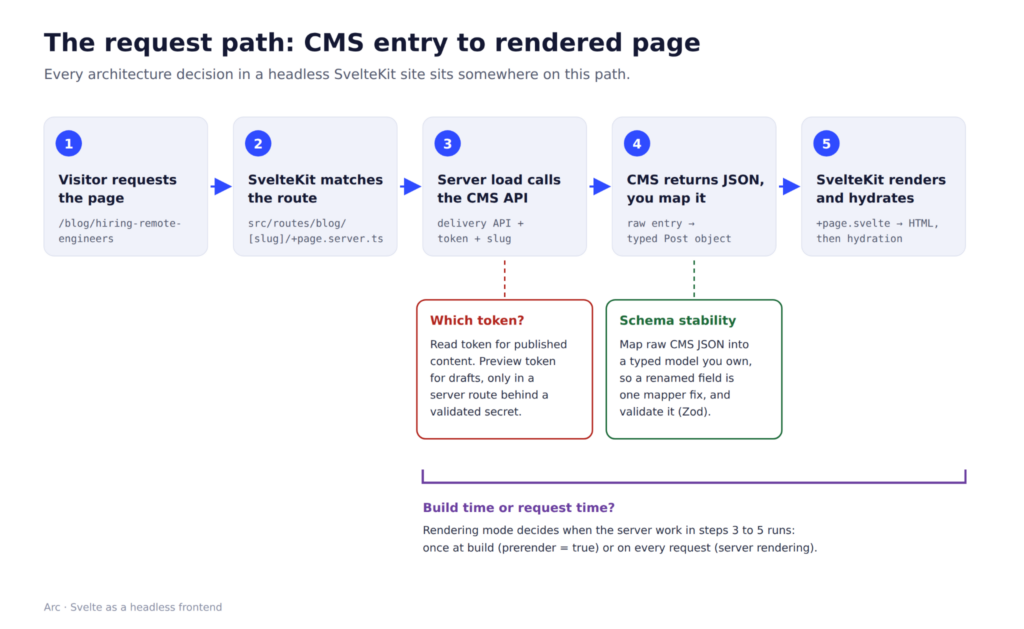
Every architecture decision in this article sits somewhere on that path. Which step runs at build time versus request time is the rendering mode question. Which token step 3 uses is the preview question. Whether step 4’s shape survives a CMS schema change is the content model question.
When a traditional CMS may be simpler
Standing up a headless CMS costs you an API dependency, a second set of credentials, and a rate limit to respect. Skip it when:
- You have fewer than 20 pages and one author. Markdown files in src/content with mdsvex or a plain import.meta.glob import beats any API call. Content ships with your git history.
- Your editors are developers. A Git-based CMS like Sveltia CMS, an open-source rewrite of Netlify CMS (now Decap CMS), gives you an editing UI backed by commits, so you get a review workflow without a hosted content API.
- The site is one WordPress theme away from done. A brochure site with a contact form and no custom interaction does not need a decoupled frontend.
Choose the right rendering mode for each content type
SvelteKit sets rendering per route through exported page options, so a documentation page and a personalized dashboard can live in the same app with different strategies. The three options you configure are prerender, ssr, and csr, all documented in SvelteKit’s page options.
By default, SvelteKit server-renders the first page a visitor sees and client-renders subsequent navigations, per the project types documentation.
Static pages for stable marketing and documentation content
Set export const prerender = true; in +page.ts or +page.server.ts and SvelteKit generates HTML at build time. The CMS gets called once during the build, never on a visitor request.
This works for pricing pages, docs, and published blog posts. For dynamic routes, the crawler follows links from prerendered pages, so unlinked slugs need an explicit entries() export in +page.server.ts that returns the slug list from your CMS.
Watch the build time. Fetching 5,000 entries one request at a time during prerendering can turn a 90-second build into a 20-minute one and can trip your CMS rate limit mid-build.
Server rendering for frequently updated or personalized pages
Leave prerender off (or set it to false) and the route runs its server load function on every request. Use this for anything that changes between builds: search results, inventory-aware product pages, or content gated behind a session.
Server rendering also lets you cache at the edge instead of in the build. Set Cache-Control headers via setHeaders in your load function and let your CDN hold the HTML for 60 seconds, which keeps CMS requests low without a rebuild.
Client rendering for interactive content experiences
Set export const ssr = false; when a route depends on browser-only APIs or user state that has no meaningful server render: a canvas editor, a chart dashboard, a live filter over a large dataset. The page ships an HTML shell and fetches its data after hydration.
Set export const csr = false; for the opposite case: a purely static page where you want zero JavaScript shipped. Forms still work through SvelteKit’s progressive enhancement fallback.
Note that SvelteKit 2.43.0 (released September 22, 2025) added experimental async SSR, which allows await inside components during server rendering when experimental.async is enabled in your Svelte compiler options. Treat it as experimental until it stabilizes; Svelte’s own docs note the flag will be removed in Svelte 6 once the feature graduates.
Rendering mode by content type
| Content type | Rendering mode | Page option | Why |
| Landing and pricing pages | Prerendered | prerender = true | Changes weekly at most; fastest possible TTFB |
| Documentation | Prerendered | prerender = true | Large but stable; version with the code |
| Blog post detail | Prerendered | prerender = true + entries() | Immutable after publish; rebuild on webhook |
| Blog index with filters | Server-rendered | default | Query params make prerendering impractical |
| Product pages with stock | Server-rendered + edge cache | default + setHeaders | Price and stock change hourly |
| Author dashboard | Server-rendered, no prerender | default | Session-dependent |
| Draft preview route | Server-rendered | prerender = false | Must never be baked into static output |
| Interactive tool or editor | Client-rendered | ssr = false | Depends on browser APIs |
Build a reliable content loading layer
The load layer is where API keys leak, where CMS schema drift breaks pages, and where a naive query pattern turns one page view into forty API calls. Getting the server-versus-universal split right prevents most of it.
When to use server and universal load functions
+page.server.ts runs only on the server. +page.ts (universal) runs on the server during SSR and again in the browser on client-side navigation.
Use +page.server.ts for every CMS call that needs a token. Use +page.ts only when the data is public, the endpoint tolerates browser traffic, and you want to skip the extra server hop on client navigation.
Here is a server load function fetching a blog post from Contentful’s Content Delivery API:
// src/routes/blog/[slug]/+page.server.ts

import { error } from '@sveltejs/kit';

import { CONTENTFUL_SPACE_ID, CONTENTFUL_CDA_TOKEN } from '$env/static/private';

import type { PageServerLoad } from './$types';

const BASE = `https://cdn.contentful.com/spaces/${CONTENTFUL_SPACE_ID}/environments/master`;

export const load: PageServerLoad = async ({ params, fetch, setHeaders }) => {

 const url = new URL(`${BASE}/entries`);

 url.searchParams.set('content_type', 'blogPost');

 url.searchParams.set('fields.slug', params.slug);

 url.searchParams.set('include', '2');

 url.searchParams.set('limit', '1');

 const res = await fetch(url, {

   headers: { Authorization: `Bearer ${CONTENTFUL_CDA_TOKEN}` }

 });

 if (!res.ok) throw error(502, 'Content API unavailable');

 const data = await res.json();

 const entry = data.items?.[0];

 if (!entry) throw error(404, 'Post not found');

 setHeaders({ 'cache-control': 'public, max-age=0, s-maxage=60' });

 return { post: toPost(entry, data.includes) };

};
Two details that matter: $env/static/private fails the build if you import it into client-reachable code, which is the guardrail you want. And include=2 resolves linked entries in one request instead of N follow-up calls.
Keep CMS tokens, draft access, and queries out of the browser
Four rules that hold across every CMS:
- Never import from $env/static/public for a token. Anything in PUBLIC_* ships to the browser bundle.
- Keep the preview token separate from the read token. A preview token returns unpublished entries. It belongs in a server-only route with auth, never in a universal load.
- Proxy client-side queries through the server. If a filter component needs live search, hit your own /api/search endpoint in a +server.ts file and let the server hold the credential.
SvelteKit’s remote functions are the likely successor to this pattern: a query function in a .remote.ts file always runs on the server, and the client calls it through a generated endpoint, so the token never reaches the browser.
Remote functions are still behind an experimental flag in the SvelteKit 3 release candidate, so keep the +server.ts proxy for production code today. - Assume the CMS query is visible. Even with a proxy, the shape of your query is inspectable. Do not rely on query obscurity to hide unpublished content.
A version note: $env/static/private is the SvelteKit 2 pattern. In SvelteKit 3, declare CMS tokens as explicit environment variables in src/env.ts and import them from $app/env/private. Like the old module, $app/env/private can’t be imported into code that runs in the browser
Map CMS entries into a stable content model
Do not pass raw CMS JSON into components. Write one mapping function per content type that converts the API response into a flat, typed object your components own.
type Post = {

 title: string;

 slug: string;

 publishedAt: string;

 heroImage: { url: string; alt: string } | null;

 body: unknown; // rich text document

};
When the CMS renames a field or nests an asset differently, you fix one mapper instead of hunting through twelve components. This is also the practical place to use an AI assistant: paste your CMS content type JSON into Claude or Copilot and ask it to emit the TypeScript interface plus a mapper function. Sanity handles this natively with TypeGen, which generates types from your schema so content queries autocomplete in your editor.
Handle pagination, images, and rich text before they break production
Pagination. Contentful caps limit at 1,000 per request and Sanity has its own response ceiling. Write a loop that pages through skip/limit and stop assuming one request returns everything.
Images. CMS image CDNs take transform parameters in the URL. Build a helper that emits a srcset (?w=640, ?w=1280, ?w=1920) and sets fm=webp, then always pass explicit width and height to prevent layout shift.
Rich text. Most modern CMSs return rich text as structured JSON with node types and marks, not HTML. Render it by walking the node tree and mapping each node type to a Svelte component: paragraph to <p>, embedded-asset-block to your image component, hyperlink to an anchor with the right rel.
Piping CMS HTML through {@html} is the XSS hole. If an entry contains raw HTML you must render, sanitize it server-side with a library like DOMPurify before it reaches the template. Structured JSON plus a component map avoids the problem entirely because you never trust arbitrary tags.
Design an editorial workflow that supports safe publishing
Publishing breaks in predictable ways: previews leak, rebuilds do not fire, and caches serve yesterday’s copy. Each has a specific fix.
Model content for editors instead of mirroring page components
A content model that mirrors your component tree feels efficient and ages badly. When you rebuild the homepage, you have to migrate every entry.
Model by meaning: a Post has a title, body, author reference, and topic tags. Presentation choices (two-column, dark hero, card grid) belong in code or in a small, explicit set of layout options.
Give editors a flexible content block list for long pages, capped at maybe eight block types. Unlimited nesting produces a page builder nobody can maintain.
Set up draft previews without exposing preview mode
Most headless CMSs give editors previews the same way: a separate preview API host plus a preview token that returns unpublished entries. Contentful uses preview.contentful.com. Sanity uses a perspective flag with a viewer token. Storyblok switches on its draft version parameter.
Wire it into SvelteKit like this:
- A route at /api/preview accepts a shared secret in the query string, validates it, and sets a signed, httpOnly, sameSite=lax cookie.
- That route redirects to the entry’s path.
- Your server load reads the cookie and swaps in the preview host and preview token.
- Every preview-capable route exports prerender = false and sets cache-control: private, no-store.
Two failure modes teams hit: a preview route deployed without secret validation, which lets anyone append ?preview=1 and read unpublished entries; and a preview cookie with no expiry, so a shared browser keeps serving drafts long after the editor left. Set a short cookie lifetime (an hour is plenty) and validate the secret on every request.
Use webhooks, rebuilds, and cache purging to publish fresh content
Webhook-triggered rebuilds are a host feature, not a SvelteKit feature. Your CMS calls a deploy hook URL on publish; your host (Vercel, Netlify, Cloudflare Pages) starts a build.
If nobody wires this up, editors publish, and the live site shows nothing new. They then publish again, assume the CMS is broken, and file a ticket. Validate the webhook signature on your receiving endpoint so a leaked hook URL cannot trigger unlimited builds.
Two approaches, with real tradeoffs:
| Approach | Publish-to-live time | Best for |
| Full rebuild via deploy hook | Minutes, scales with page count | Sites under a few thousand pages |
| Server rendering + targeted cache purge | Seconds | Large catalogs, frequent edits |
For large content sets, server-render the route, cache it at the edge with s-maxage, and have the webhook purge only the changed path. Some hosts expose incremental static regeneration through their SvelteKit adapter, which lets a stale page serve immediately while regenerating in the background. Confirm the behavior in your adapter’s documentation before you design around it.
Compare Sveltia CMS and other headless CMS options for SvelteKit
| CMS | API shape | SvelteKit tooling | Preview/draft support | Pricing note |
| Contentful | REST + GraphQL, separate preview.contentful.com host | JS SDK, no Svelte-specific package | Preview API with dedicated token | Free tier available; paid tiers metered on API calls and records |
| Sanity | GROQ over HTTP, plus GraphQL | JS client, TypeGen for typed queries; documented SvelteKit path | Draft perspective with viewer token | Free tier with usage limits; usage-based paid plans |
| Strapi | REST + GraphQL, self-hosted or Strapi Cloud | Standard fetch, no official Svelte SDK | Draft and Publish plus Preview feature | Open source and self-hostable; Strapi Cloud priced per project |
| Storyblok | REST content delivery API with draft and published versions | JS client; visual editor works with any framework | Draft version via token, plus visual editor | Free tier available; paid plans by seats and traffic |
| Builder.io | REST Content API plus a GraphQL Content API | Official @builder.io/sdk-svelte; the visual editor renders inside your running app | The Visual Editor loads your app at a preview URL and shows edits in place | Free plan for one user; paid plans priced per user |
| Sveltia CMS | Git-based, content lives in your repo | Built with Svelte; drop-in for Jamstack sites | Editorial Workflow via pull requests; preview workflow planned | Free and open source |
Sveltia CMS deserves attention when your content volume is modest, and your team is comfortable with Git. It ships as a complete rewrite of Netlify CMS, keeps entries as files in your repository, and supports a review process where editors submit changes and reviewers approve them before merge. No content API, no rate limit, no separate token to protect. The tradeoff is that every publish is a commit, so your rebuild is your deploy.
For teams that want the CMS itself built on SvelteKit, SveltyCMS is an open-source, database-agnostic option.
Check current pricing pages before you commit. Metered API-call limits are the constraint that bites growing content sites, and free tiers change.
Make SvelteKit content sites easier to operate at scale
Content sites can degrade without you noticing it: builds creep from two minutes to eleven, a webhook starts failing silently, a schema change ships a page of empty <p> tags. Instrumentation catches all three.
Prevent slow builds and excessive content API requests
Build time is the first thing to break as content grows. Fixes that work:
- Batch your entry fetches. One paginated query returning 100 entries beats 100 single-entry requests during prerendering.
- Cache CMS responses inside the build. A module-level Map keyed by entry ID stops the same author record from being fetched 400 times.
- Stop prerendering the long tail. Prerender the newest 200 posts and server-render the rest with an edge cache. Older content rarely justifies build minutes.
- Watch include depth. include=10 in a Contentful query pulls a huge object graph. Depth 2 usually covers what a page renders.
- Respect rate limits. Contentful’s Content Delivery API enforces a per-second rate limit that depends on your plan (see the rate limits section of the CDA docs); stay well under it with a concurrency cap of 8 to 10 parallel requests so builds do not get throttled halfway through.
Monitor failed webhooks, stale pages, and schema changes
Add these before you need them:
- Log every webhook receipt with entry ID, event type, and outcome. When an editor says “I published an hour ago,” you can answer in seconds.
- Alert on deploy-hook failures. Most hosts expose build status via API or notification, and a failed rebuild after a publish is a content outage.
- Stamp a build timestamp into your HTML as a meta tag. Comparing it against the CMS entry’s updatedAt tells you instantly whether a page is stale.
- Validate content at the boundary. Run mapped entries through a schema validator (Zod works well) inside your load function and log validation failures. A renamed CMS field surfaces as a logged error, not a blank page.
- Watch content API usage against your plan limits so you catch overages before your CMS throttles a build.
Know when to bring in specialized SvelteKit expertise
Bring in a specialist when the work moves past routing and into the operational layer: preview isolation, adapter-specific caching behavior, mapping a large legacy content model into a new one without breaking published URLs.
Those problems reward someone who has shipped this pattern before. Svelte’s hiring pool is smaller than React’s by most job-board and survey measures, which is why teams often widen the search geographically; our comparison of where to find vetted Svelte developers covers what to look for when screening for this kind of production experience specifically.
Frequently asked questions
What is a headless CMS?
A headless CMS stores and manages content through an API instead of coupling it to a specific frontend or templating system. Editors write and publish content in the CMS’s own UI, and any frontend, a SvelteKit site, a mobile app, or another client, fetches that content as structured JSON and decides how to render it. The CMS has no opinion about HTML.
Can you use a headless CMS with Svelte or SvelteKit?
Yes. SvelteKit’s load functions are built for exactly this pattern: a server load function calls the CMS’s content delivery API, maps the response into a typed object, and passes it to the page. Rendering mode, preview handling, and rebuild triggers all layer on top of that basic fetch.
Which headless CMS works best with SvelteKit?
It depends on your team’s needs more than any one CMS being universally best. Sanity has the most direct SvelteKit path, including typed query generation. Contentful and Storyblok both work well through their JS clients without a dedicated Svelte SDK. Sveltia CMS fits teams that want a Git-based workflow instead of a hosted content API, and it’s built with Svelte itself.
Is it safe to render CMS content in Svelte with {@html}?
Only after sanitizing it server-side. Piping raw CMS-supplied HTML directly into {@html} is an XSS risk if any editor or integration can introduce unexpected markup. Most modern CMSs avoid this entirely by returning rich text as structured JSON, which you render safely by mapping node types to Svelte components instead of trusting arbitrary HTML.
How do you preview draft content in SvelteKit before it’s published?
Set up a dedicated preview route that validates a shared secret, then sets a short-lived, signed, httpOnly cookie. Your server load function checks for that cookie and swaps in the CMS’s preview API host and preview token when it’s present. Every preview-capable route should be excluded from prerendering and set to no-store caching so draft content never leaks into the public, cached version of the page.
A practical path to a maintainable content platform
Wiring a headless CMS into SvelteKit comes down to a handful of decisions you make once and live with. Keep every credentialed CMS call in +page.server.ts, map API responses into your own typed content model, and pick a rendering mode per route based on how often that content changes.
Prerender the stable pages, server-render anything that shifts hourly, and route drafts through a secret-validated preview endpoint with prerender = false and a short-lived cookie. Wire the publish webhook to a deploy hook or a targeted cache purge, validate its signature, and log every receipt so a silent failure does not become a stale homepage.
Render rich text by walking structured JSON into Svelte components and sanitize server-side before any {@html} touches a template. Then add the boring instrumentation: a build timestamp in your HTML, Zod validation at the load boundary, and an alert on failed deploy hooks.
If your team is wiring a headless CMS into a SvelteKit site and you want it right the first time (previews that stay private, rebuilds that fire on publish, rich text that renders safely), you need engineers who have architected this before.
Arc pre-vets Svelte developers for technical depth and English fluency before you see a profile. HireAI matches your requirements against a pool of vetted candidates and returns a shortlist in minutes.