



Your Marketo-Salesforce sync is the integration that decides whether your pipeline numbers mean anything, whether sales actually believe the leads you send them, and whether your attribution model is describing reality or noise.
And when it breaks, it’s almost never loud. A field stops updating, a dedup rule misses something, a routing rule fires in the wrong order. Three months later, someone in a pipeline review asks why MQL-to-opportunity conversion has been sliding, and nobody has a good answer.
This guide covers both a concise setup primer to get the sync running correctly from the start and the maintenance layer that most guides skip entirely: field ownership, dedup mechanics, conversion timing, and the failure modes that show up once your database grows beyond the point where mistakes are easy to spot.
If you’ve ever pulled up a sync error log at 11 pm because a Salesforce workflow rule overwrote a lifecycle stage value five seconds after Marketo wrote it, you already know why this connector needs someone senior watching it.
In this guide:
- Setup and prerequisites: what you need before the first sync
- How the sync actually moves data
- Field ownership: who actually controls what
- Field governance: where most of the silent corruption happens
- Deduplication: where instances quietly rot
- Lead routing and the moment everything can go wrong
- Native sync vs. middleware and iPaaS alternatives
- Failure modes at scale
- Where AI genuinely helps here
- FAQ
Quick Diagnostic: Is Your Sync Broken Right Now?
| Symptom | Most likely cause | First thing to check |
| Records stuck in “Sync to SFDC” queue for hours | API call limit hit | Pull today’s API usage report in Salesforce; check what’s consuming calls outside business hours |
| Fields blank in Salesforce after sync | Field-level security blocking the sync user | Check the sync user’s profile — does it have write access on the affected field? |
| Lead Score resets to zero after conversion | Score not in conversion field mapping | Open lead conversion settings in Salesforce; add Lead Score explicitly |
| Lifecycle Stage reverts minutes after Marketo writes it | A Flow or trigger is overwriting the value | Search Salesforce Flows and triggers for anything writing to Lifecycle Stage |
| Duplicate contacts appearing from form fills | Marketo created a second record on a different email | Check for same name/company with different email; dedup logic only matches on email |
| Campaign member status not sticking in Salesforce | Competing automation or missing write permission | Pull sync error log filtered to that campaign; check sync user field access on Campaign Member Status |
| Attribution gaps after a lead converts | Custom fields not mapped in conversion settings | Review conversion field mapping for MQL Date, Original Source, and Lead Score |
| Sync errors spike after a Salesforce release | New validation rule or required field added | Review the release notes; test the sync user against new validation rules on a dummy record |
Setup and Prerequisites: What You Need Before the First Sync
Before anything syncs, four things need to be in place. Skip any of them, and you’ll spend time debugging a broken sync that was never set up correctly to begin with.
- Salesforce edition
The native Marketo connector requires Salesforce Enterprise or Unlimited. The Professional edition doesn’t expose the API access that Marketo needs. If your org is on Professional, you’re looking at a third-party middleware solution instead of the native connector.
- A dedicated sync user
Create a Salesforce user whose only job is running the sync; not a real person’s login or a shared admin account. This matters for two reasons: field-level security and audit trails.
Every field write that Marketo makes will appear to come from this user, which is how you trace sync-related changes later. Give it the Marketo Sync profile with read/write access on every object and field you intend to sync.
- The Marketo managed package
Install it from the Salesforce AppExchange before you connect the two systems. It adds the fields Marketo needs (Lead Score, Acquisition Program, etc.) to your Salesforce objects. Installing it after the initial sync runs creates a messy retroactive field-mapping problem.
- Field mapping decisions made upfront
Before the first sync runs, decide which fields sync and in which direction. The initial full sync will pull everything it can access; if you haven’t scoped it down, you’ll sync fields you never intended to, and cleaning that up takes longer than doing it right the first time. Map only what you need, document ownership for each field, and lock it in before flipping the switch.
Once those four are in place, the initial full sync will run. It typically takes a few hours for smaller databases and up to a couple of days for larger ones. Run it off-hours to avoid competing for API calls with other integrations and regular Salesforce users.
Why This Connector Carries So Much Risk
Lead scoring, MQL handoff, campaign attribution, pipeline forecasting, SLA-based routing —all of it runs through this sync. Break one field mapping, and the damage doesn’t show up where you broke it, but somewhere else, weeks later, in a report nobody thinks to connect back to the original cause.
What Actually Breaks When Sync Integrity Slips
Sales stops trusting MQLs because they’ve worked duplicate records, or gotten handed a lead with half the fields blank. Attribution starts double-counting (or undercounting) because campaign membership didn’t carry over cleanly. Conversion rates look worse than they actually are because a merged record split activity history across two people who are actually the same person.
That is a trust problem. Once a VP of Sales decides “marketing’s data is bad,” that opinion sticks around a lot longer than the bug that caused it. You can fix the sync in a day. Getting sales to trust your numbers again takes a couple of quarters, if you’re lucky.
A Failure Chain That Plays Out More Than Anyone Admits
Here’s a version of this that happens constantly and almost nobody catches in time: Someone fills out a gated content form using their personal Gmail. Marketo creates a lead record. Two weeks later, that same person fills out a demo request; this time with their work email, because that’s the one they use for anything that looks like a sales conversation.
Marketo has no way of knowing it’s the same human being. It matches on email only, so as far as Marketo’s concerned, you’ve just gotten a second new lead. Both records sync to Salesforce, and an SDR picks up one of them.
The other sits in a queue, untouched, because nobody’s looking for it. Eventually, the SDR converts the one they’re working with, and now you’ve got a contact on one side and an orphaned, unconverted lead on the other.
Your overnight merge job might catch the Marketo side of this. It almost never cleanly catches the Salesforce side because, by the time it runs, the conversion has already happened, and Salesforce treats converted leads as basically untouchable.
Pull your MQL-to-opportunity report after that, and this person shows up as two MQLs against one opportunity (which tanks your conversion rate) or the surviving record loses its original campaign membership in the merge, and the person disappears from attribution entirely, like they were never marketed to at all.
That’s one person, two forms. Run that same pattern across a few thousand people a month, and you start to understand why pipeline reporting in a lot of B2B orgs is persistently wrong.
A Note on PII, GDPR, and Synced Data
The Marketo-Salesforce sync moves personally identifiable information between two systems, across data centers, and potentially across jurisdictions. For most B2B teams, this is low on the priority list until it isn’t; usually when legal asks who has access to what, or when a prospect submits a GDPR deletion request and you realize you have no documented process for what happens on both sides.
Three things worth getting right before the sync runs at scale:
- Data residency
Marketo and Salesforce both offer region-specific data storage options, but they’re not configured by default. If your database includes EU residents and your Marketo instance is US-hosted, you may have a transfer compliance gap. Check where each system stores data and whether your current setup matches your privacy policy commitments.
- Deletion and suppression handling
A GDPR deletion request means the record needs to come out of both systems. Deleting in Salesforce doesn’t automatically delete in Marketo, and vice versa. You need a documented, tested process for both directions and someone who owns it.
The same applies to unsubscribe and suppression list management: a suppression in Marketo should be reflected in Salesforce, and your sync should be set up to carry that status reliably.
- Field-level access on PII
The sync user needs write access to do its job, but not every Salesforce user needs to see every field Marketo populates. Behavioral data, lead scores, and engagement history are sensitive enough that field-level security on those fields is worth the setup time. It also makes your audit trail cleaner if you ever need to demonstrate access controls to a compliance team.
All of this requires a conversation with your privacy or legal team before you’re syncing a million records, not after.
How the Sync Actually Moves Data
You can’t manage what you don’t understand the mechanics of, and the native connector’s behavior is less intuitive than most people assume going in.
Sync Direction, Timing, and What’s Actually Bidirectional
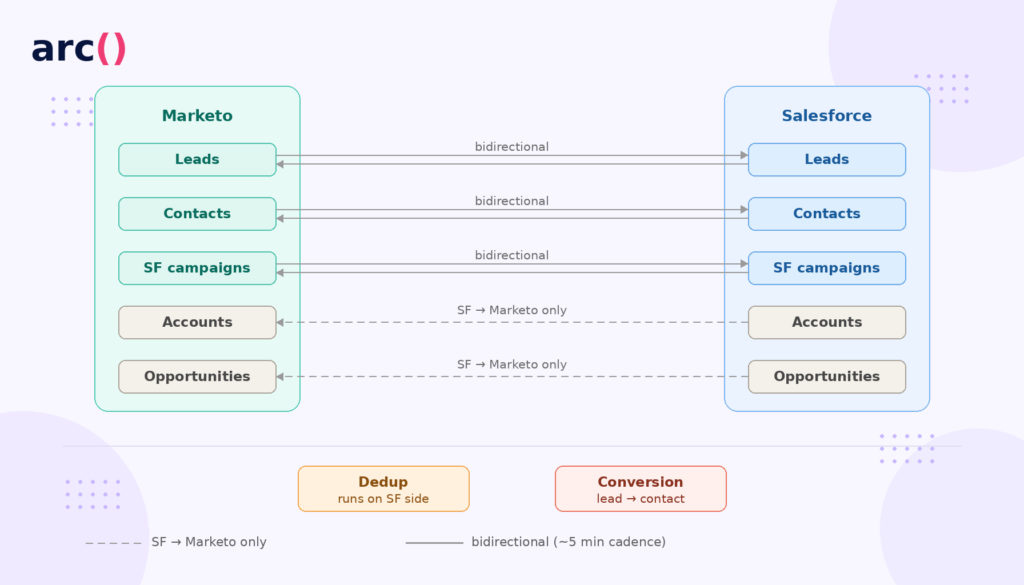
After the initial full sync (which can take anywhere from a few hours to a couple of days, depending on how large your database is), incremental syncs run every five minutes, picking up anything that changed since the last pass.
Here’s the part that trips people up: bidirectional sync only applies to leads, contacts, and Salesforce campaigns. Accounts, opportunities, custom objects, users, activity; all of that is one-directional, Salesforce to Marketo, full stop. There’s no native way to push account-level data from Marketo back into Salesforce.
This matters more than it sounds like it should. If your marketing team is enriching account fields in Marketo (industry, employee count, technographic signals from a data provider), none of that reaches Salesforce on its own.
You need something else: a webhook, a middleware layer, or someone manually pushing updates. A lot of teams don’t realize this until they’ve been enriching data in Marketo for six months and discover sales never saw any of it.
Native Sync vs. Sales Insight: Two Different Systems and Failure Modes
The native connector moves record data. Marketo Sales Insight is a separate Salesforce package that surfaces engagement data (interesting moments, scores, email opens) within the Salesforce UI for reps to see.
People conflate the two constantly. Having Sales Insight installed doesn’t mean reps are seeing real-time Marketo activity. Sales Insight runs on its own schedule and burns its own API calls. If your sync connector is already eating into your daily API limit, Sales Insight data lags, sometimes fails outright, and your rep calls a “hot lead” who, as far as they can tell, has never heard of your company.
Field Ownership: Who Actually Controls What
Every field that syncs needs one clear owner. Skip this step, and you end up with two flavors of problem: sync loops where both systems keep overwriting each other every five minutes, or silent data loss where a Salesforce automation quietly blanks out something Marketo just wrote.
| Field Type | Owned By | Sync Behavior | Examples |
| Marketo-owned | Marketo | Marketo writes to Salesforce; Salesforce-side edits get overwritten next cycle | Lead Score, Engagement Score, behavioral fields |
| Salesforce-owned | Salesforce | Salesforce writes to Marketo; Marketo-side edits get overwritten next cycle | Opportunity Stage, Account Owner, revenue fields |
| Bidirectional | Both | Last write wins, whichever system updated most recently | Lead Status, Lifecycle Stage (risky if undefined) |
| Marketo-only | Marketo | Never syncs to Salesforce at all | Internal segmentation fields, processing flags |
The bidirectional row is where most of the damage happens. Say you’ve got Lifecycle Stage set as bidirectional, and a Salesforce Process Builder resets it to “New” the moment a lead gets reassigned to a new rep.
If that fires after Marketo just moved the person to “MQL,” you lose, and Marketo’s reporting now thinks that person was never an MQL at all.
The fix is almost always the same: make Lifecycle Stage Marketo-owned and let it serve as the system of record for lifecycle transitions. Stop treating it as a field where two systems can both touch.
Field Governance: Where Most of the Silent Corruption Happens
The initial field mapping is the easy part. Anyone can map fields once. Keeping that mapping accurate as both systems evolve (new picklist values, Flows, and fields someone added without telling you) is the actual job.
The Three Mistakes That Cause Most of the Damage
- Lead Score disappearing on conversion
When a lead converts to a contact in Salesforce, field values are remapped or dropped based on your conversion field mapping. If Lead Score isn’t explicitly included there, the contact comes out the other side with no score, and Marketo dutifully syncs a blank value right back.
- Lifecycle Stage getting stomped by a Flow nobody told you about
A Salesforce admin adds a Flow that sets Lead Status to “Working” the second a rep claims a lead. That Flow fires a few seconds after the Marketo sync writes “MQL”, and now your reporting shows this person was never an MQL, even though they clearly were five seconds earlier.
- Picklist values that don’t quite match
Marketo sends “Marketing Qualified.” Salesforce’s picklist has “Marketing_Qualified,” underscore, and all. The sync doesn’t throw an error for this; it just fails the write and moves on. You get a blank field and find out about it only when someone happens to notice.
Picklist Drift and the Automations Nobody Audits
Picklist drift is exactly what it sounds like: someone adds or renames a value in Salesforce without making any changes on the Marketo side. The sync never validates a picklist value before writing it; it just tries, fails on mismatch, and keeps going.
Workflow rules and Flows make this worse. Every automation that touches a synced field is a potential collision waiting to happen. A Flow that sets Lead Source on record creation, for example, can overwrite the UTM-derived Lead Source value Marketo just populated.
Your channel attribution breaks. Nobody notices until someone’s trying to explain a board deck that says half your pipeline came from “Other.”
A Field Audit You Can Actually Run
Do this quarterly, at a minimum. If your Salesforce admin team ships changes often, do it monthly.
| Step | Action | Tool/Method |
| 1 | Export all synced field mappings | Marketo Admin > Field Management |
| 2 | Cross-reference against Salesforce field definitions — picklist values, data types, field-level security | Salesforce Setup > Object Manager |
| 3 | Find every Flow, Process Builder, and trigger that writes to a synced field | Salesforce Setup > Flows, plus a metadata tool for triggers |
| 4 | Flag any bidirectional field with a Salesforce automation writing to it | Manual review of steps 1–3 |
| 5 | Test flagged fields: update a test record in Marketo, check it survives two sync cycles | Marketo test lead + Salesforce inspection |
| 6 | Write down field ownership decisions somewhere both admin teams can see | Shared doc with a change log |
The goal isn’t zero bidirectional fields. Some fields genuinely need both systems touching them. The goal is that every bidirectional field has an actual rule for who wins, instead of “whoever wrote last, I guess.”
Deduplication: Where Instances Quietly Rot
This is the part of a Marketo Salesforce integration that does the most damage with the least visibility because both platforms have their own dedup logic, and those two systems don’t communicate about it.
Why Marketo and Salesforce Dedup Logic Don’t Agree
Marketo dedupes on email address. That’s it. Same email, it’s the same person; different email, it’s a stranger, even if every other field matches exactly. Salesforce’s native duplicate management is more flexible (matching rules can weigh name, email, phone, and company), but it flags potential duplicates rather than merging them automatically.
Which means these two systems can reach completely different conclusions about whether two records are of the same person, and neither one knows the other disagrees.
Here’s where it actually gets dangerous: merge in Salesforce first, and Marketo will detect the surviving record on its next pass and fall in line. Merge in Marketo first; Salesforce still has two separate records there until the sync catches up.
In that window, an SDR can work both; an assignment rule can route them to two different reps, and campaign membership can split across both records before anyone notices there was ever a duplicate.
What Conversion Timing Does to Attribution
Lead-to-contact conversion adds its own risk on top of this. When a lead converts, Salesforce creates (or merges into) a contact and, depending on your setup, an opportunity. If Marketo hasn’t merged the duplicate lead yet, when that conversion fires, you end up with a contact carrying half of its activity history and an orphaned lead sitting in Marketo holding the other half.
Multi-touch attribution takes the direct hit here: First-touch data might be stranded on the orphan record, and last-touch lives on the contact. Neither record, on its own, tells you what actually happened.
A Dedup Process That Actually Catches Things
| Step | Action | Frequency |
| 1 | Run a Marketo smart list for likely duplicates — same name, different email | Monthly |
| 2 | Pull a Salesforce duplicate report off your matching rules | Monthly |
| 3 | Cross-reference both — find what’s duplicated in one system but not flagged in the other | Monthly |
| 4 | Prioritize merges for anything with an open opportunity or active campaign membership | As found |
| 5 | Merge in Salesforce first, then confirm Marketo reflects the surviving record | Per batch |
| 6 | Check that campaign membership, score, and activity carried over to the survivor | Per batch |
| 7 | Check the sync error log for merge-related failures | Weekly |
Past around 100,000 records, doing this manually becomes unrealistic, and it’s worth looking at a dedicated tool. Cloudingo and RingLead both do fuzzy matching that catches name-variant and domain-match cases; email-only logic just can’t see them.
The good ones can also be configured to respect any field ownership rules you already have in place, rather than overwriting them on merge.
Lead Routing and the Moment Everything Can Go Wrong
The exact moment a lead converts to a contact is, in my experience, the single riskiest point in the entire integration. More data gets lost here, more leads get misrouted here, and more SLA clocks reset incorrectly here than at any other stage of the process.
What Happens, Mechanically, the Second a Lead Converts
Salesforce creates a contact or merges it into an existing one if there’s a match. It may create an opportunity, depending on your settings. The original lead record gets marked converted and becomes read-only. On the next sync, Marketo notices the conversion and re-points its record to the new contact ID instead of the old lead ID.
The catch is in step one. Salesforce doesn’t auto-map custom fields during conversion; you have to specify what carries over. If Lead Score, MQL Date, or Original Source isn’t in that conversion mapping, it just vanishes the moment the lead becomes a contact. Nobody deletes them because they simply never get carried forward.
When Round Robin Tools and Native Assignment Rules Fight Each Other
Tools like LeanData, Chili Piper, and Distribution Engine sit on top of Salesforce’s native assignment rules, and when both are active on the same record, you get unpredictable results.
This is a real sequence:
Marketo syncs a new MQL into Salesforce, triggering the native assignment rule that routes the lead to Rep A. Thirty seconds later, LeanData fires and reroutes the same lead to Rep B based on territory logic. Your SLA clock started the moment Rep A got assigned, but Rep B is the one who actually owns the lead now, and depending on how your tool tracks this, that SLA timer either shows the wrong start time or never restarts at all.
The fix isn’t complicated, even if implementing it takes some political capital: pick one system to own routing, and turn off the other. Usually, that means disabling native Salesforce assignment rules for anything that’s supposed to flow through your round robin tool.
Sync Delay and the Stale-Lead Problem
A five-minute sync window is harmless for most fields. It’s not harmless for routing and status fields. If a Marketo program flips Lead Status to MQL and a Salesforce Flow assigns the lead based on that status change, the rep gets the assignment immediately but might not see the updated score, activity history, or interesting moments for another 5 minutes, sometimes longer if there’s a backlog.
So the rep calls, and they have no context. The call goes generic instead of personalized, because the data that would’ve made it personal hasn’t landed yet. Your speed-to-lead metric looks great in the dashboard, but your connect rate tells a different story.
Failure Modes at Scale
Past roughly 200,000 records and a few hundred active campaigns, this integration starts breaking in ways that simply didn’t exist when your database was smaller. Catching these early means having a real cadence, not waiting for someone in sales to complain.
| Symptom | Likely Cause | Fix |
| Records stuck in “Sync to SFDC” for hours | API call limit exceeded | Audit what’s eating your API calls; batch heavy updates outside business hours |
| Fields blank in Salesforce after sync | Field-level security blocking the sync user | Grant the sync user write access on the field/profile |
| Lead Score resets to zero post-conversion | Score not mapped in lead conversion settings | Add it explicitly to the conversion field mapping |
| Duplicate contacts from form fills | Sync runs before Salesforce dedup logic evaluates | Add a delay or sync filter so dedup runs first |
| Campaign member status reverts after sync | A Flow or trigger overwriting Marketo’s update | Find the competing automation; exclude or reassign ownership |
| Sync errors spike right after a Salesforce release | New validation rules or required fields, unannounced | Review the release notes before they ship; test with the sync user |
A Cadence Worth Actually Following
Monthly: check the sync error log for anything recurring on the same records. Pull your API usage report: if you’re regularly above 70% of your daily limit, find out what’s driving it. Run your dedup audit. Check for any new Flows or triggers writing to Marketo-owned fields.
Quarterly: full field mapping audit, such as picklists, data types, field-level security, all of it. Archive Salesforce campaigns with no members and no recent activity; bloated campaign membership slows the sync down more than people expect.
Test the conversion field mapping on a dummy record. Review what permissions the sync user actually has against your current object structure.
Native Sync vs. Middleware and iPaaS Alternatives
The native Marketo-Salesforce connector is the right default for most B2B marketing teams. It’s maintained by Adobe, it’s well-documented, and it handles the standard lead/contact/campaign sync without requiring engineering involvement to keep running.
But it has real architectural limits, and knowing when those limits justify a different approach saves you from spending six months patching workarounds before admitting the native connector isn’t the right tool for what you’re actually trying to do.
When the Native Connector Is Enough
The native sync handles the job well when your data flow is primarily lead and contact records moving between two systems, your field mapping is stable and relatively simple, you don’t need real-time sync (five minutes is acceptable), and your team doesn’t have the engineering bandwidth to maintain a custom integration.
For most companies under a few million records with a standard MQL-to-opportunity motion, this covers everything.
When to Consider Middleware or a Custom API Layer
Three situations push teams toward middleware tools like Workato, MuleSoft, or Zapier, or toward a fully custom API integration:
- You need to sync objects the native connector doesn’t support. Custom objects, account-level data flowing from Marketo to Salesforce, or non-standard Salesforce objects all sit outside what the native connector can move. Middleware fills that gap without requiring you to build and maintain a full API integration from scratch.
- You need real-time or near-real-time sync. The native connector’s five-minute cadence is harmless for most fields. For time-sensitive routing (an SDR needs to call within two minutes of a form fill) or real-time personalization, five minutes is too slow. Middleware tools can trigger on events rather than polling on a schedule.
- You’re connecting more than two systems. If Marketo and Salesforce are two nodes in a larger data flow that also includes a data warehouse, a customer success platform, or a product analytics tool, a dedicated iPaaS layer gives you one place to manage the logic rather than a tangle of point-to-point connectors each with their own failure modes.
The tradeoff is real: middleware adds cost, a system to maintain, and puts engineering or a dedicated RevOps engineer in the critical path for any changes. Workato and MuleSoft aren’t self-service tools, unlike the native Marketo connector.
Before going that route, it’s worth being honest about whether the native connector is actually insufficient or misconfigured.
Native Connector vs. Middleware vs. Custom API: How They Compare
| Dimension | Native Connector | Middleware (Workato, MuleSoft) | Custom API |
| Setup complexity | Low: managed package + sync user | Medium: workflow design required | High: engineering build required |
| Objects supported | Leads, contacts, SF campaigns (bidirectional); others one-directional | Configurable: most standard and custom objects | Full flexibility |
| Sync speed | ~5 minutes | Near real-time (event-triggered) | Real-time if built that way |
| Maintenance | Adobe-managed connector | Your team manages workflow logic | Your team manages everything |
| Cost | Included in Marketo license | $15,000–$50,000+/year depending on volume | Engineering time + infrastructure |
| Best for | Standard MQL motion, stable field mapping | Multi-system data flows, custom objects, real-time needs | Highly custom requirements, full control needed |
Where AI Genuinely Helps Here
Worth being honest about this: AI isn’t doing much for sync architecture or field governance yet. Where it does help is narrower and real.
Dedup and match scoring
Tools like Cloudingo and RingLead use fuzzy matching to catch the duplicates email-only logic misses, and some now layer in models that learn from your past merge decisions to get better at flagging confident matches over time.
Lead scoring
Marketo’s native scoring is rules-based; you set the points and the thresholds. Tools like 6sense, MadKudu, or Salesforce Einstein evaluate behavioral and firmographic signals that a static rule set can’t really capture, and those scores feed back into the same fields that drive your routing.
Anomaly detection on the sync itself
A handful of newer tools watch for unusual patterns (a sudden spike in errors, an unexplained drop in sync volume, or API usage that doesn’t match historical baselines) and flag them before they become a data quality problem three weeks later. This space is still early, but for teams running large databases, it’s already useful.
None of this replaces someone who actually understands field ownership and routing logic. It just shrinks the pile of things that person has to manually check every week.
Frequently Asked Questions
How do I connect Marketo to Salesforce without the initial sync timing out or blowing through API limits?
Run it off-hours, evenings, or weekends, when other integrations and regular Salesforce users aren’t competing for the same API calls. Trim your field list down to what you actually need before that first sync runs; you can always add more later. Keep an eye on API usage while it’s running, and pause any other scheduled tasks if you start creeping past 80% of your daily limit.
Which system should own fields like Lead Status, Lifecycle Stage, and MQL Date?
Marketo, generally, for anything lifecycle-related, because it’s the system actually running the logic that sets those values. Salesforce should own the sales process fields: Opportunity Stage, Close Date, and Account Owner.
Try to avoid leaving anything truly bidirectional unless you’ve got a documented, tested rule for which system wins in every scenario you can think of. Undocumented bidirectional fields are where most of this breaks.
How do I stop Salesforce automations from overwriting values Marketo just wrote?
Audit every Flow and trigger touching a synced field, as there are usually more than people expect. For Marketo-owned fields, add a condition to the Salesforce automation that checks whether the update came from the Marketo sync user, and skips if so.
If you’re running a round robin tool, turn off native Salesforce assignment rules for any lead routed through it. Two systems fighting over the same decision is worse than either one alone.
Why does Marketo create duplicate records on form fills, and how do I stop the second one before merge logic catches it?
Because Marketo only checks email. Same person, different email, and it has no way of knowing; it just creates a new record. Progressive profiling that pushes toward a consistent identifier helps. So does running a pre-sync dedup pass that checks name and company before anything hits Salesforce. If you’re at a real scale, a fuzzy-matching tool will catch variants that email-only logic structurally can’t.
Campaign Member status updates from Marketo aren’t showing up in Salesforce, or they revert after a few minutes. What’s going on?
Check for a Flow or trigger that fires on campaign member status changes and overwrites whatever Marketo just set. Pull the sync error log filtered to that campaign and date range. Also worth checking: does the Marketo sync user actually have write access to the Campaign Member Status field? Field-level security restrictions fail silently, with no error, just a value that won’t stick.
If the same person exists as both a Lead and a Contact in Salesforce, which one does Marketo sync to?
The contact. Salesforce’s native logic prioritizes contacts over leads when both exist with the same email. You can confirm this yourself by creating a test lead and a test contact with matching emails, updating something in Marketo, and checking which record actually changed. If your process requires the lead to sync instead, the real fix is to convert that lead to a contact first and remove the ambiguity entirely.
Why Most Broken Syncs Trace Back to a Staffing Decision
Most of what’s described in this piece is a systems problem wearing an admin task’s clothes. Setting up a sync filter is easy, but knowing which filter to set up, understanding what it’ll do to your SLA timers three steps downstream, and being able to actually trace a cascade failure back to its root at two in the morning; that’s a different skill entirely, and it’s usually earned the hard way.
A junior admin can get the initial sync running, but keeping it healthy through every Salesforce release, every new routing tool someone adds, every quarter of database growth takes someone who’s already lived through the version of this where a single picklist mismatch blanked out Lead Source on five thousand records over a weekend, and nobody caught it until Monday.
The cost here isn’t abstract. A sync that corrupts lifecycle stage data for one quarter means every pipeline review, board report, and capacity model that touched that data during that window was built on numbers nobody should have trusted. The technical fix takes a day. Earning back the credibility takes a lot longer.
Most companies that lost control of this integration did it because whoever was maintaining the sync had never had to debug a duplicate-lead storm or untangle a routing decision that three different automations were fighting over at the same time.
That’s something you learn from having broken it once already, somewhere else. Arc connects companies with vetted, senior Marketing Operations and RevOps professionals who’ve owned integrations like this end-to-end, not just configured them once and moved on.
Browse talent today. You pay $0 until you hire.